> ## Documentation Index
> Fetch the complete documentation index at: https://help.konfhub.com/llms.txt
> Use this file to discover all available pages before exploring further.
# AI Photo Gallery: Face Recognition for Event Photos
> AI photo gallery for events: attendees scan their face to find photos instantly. Supports public or private access, custom branding, and social sharing.
After every great event, attendees want one thing: their photos. But when a photographer captures thousands of images across a full-day conference or expo, finding your own face in that sea of shots is like hunting for a needle in a haystack. KonfHub's AI Photo Gallery solves this with face recognition technology — attendees scan their face, and the gallery instantly surfaces every photo they appear in. No scrolling, no searching, no sharing massive zip files. Just a beautiful, branded gallery where every attendee can find and share their moments in seconds.
The gallery lives at gallery.konfhub.com/youreventname and is accessible from any device without requiring an app download.
 The AI Photo Gallery is available on the **Gold plan**. [View pricing](https://www.konfhub.com/pricing) to upgrade or contact the KonfHub team for a demo.
***
## Why AI Face Recognition Changes Event Photography
Traditional event photo distribution means emailing zip files, posting albums to Google Drive, or hoping attendees tag themselves on social media. None of these approaches scale to thousands of images, and most attendees never find their photos at all.
With KonfHub's AI-powered gallery:
Attendees scan their face once using their device's camera, and the AI matches their face against every uploaded image — returning only the photos they appear in.
Whether you have 200 photos from a workshop or 10,000 from a multi-day conference, the face recognition engine processes every image with the same speed and accuracy.
Attendees access the gallery via a browser link — no download or account creation needed. Just open the URL, scan your face, and view your photos.
Every attendee who finds their photos is one click away from sharing them on social media, creating organic reach and authentic user-generated content for your event brand.
***
## Gallery Features
### AI-Powered Face Recognition
The core of the gallery experience is its face recognition engine. When an attendee opens the gallery and chooses to find their photos, they use their device's camera to capture a quick selfie scan. The AI then searches the entire gallery and returns a personalized collection of images featuring that attendee.
This is particularly powerful for large events:
* A speaker who gave a keynote can instantly find all the stage photography
* An attendee who visited multiple booths can collect every candid shot from the day
* A sponsor's team members can each find their individual photos without digging through thousands of images
Upload photos in batches as the event progresses — during lunch breaks or between sessions — so attendees can start finding and sharing their photos while the event is still live.
***
### Public vs. Private Galleries
You control who can access your gallery. KonfHub gives you two visibility modes:
Anyone with the gallery link can browse and search for photos. Ideal when you want to maximize reach, showcase event highlights publicly, and encourage sharing among attendees and their networks.
Access is restricted to verified attendees only. Visitors must authenticate — typically via their event registration email — before viewing or searching for photos. Ideal for corporate events, exclusive gatherings, or events where data privacy is a priority.
You can switch between public and private modes at any time from your gallery settings, giving you flexibility as your event evolves.
***
### White-Labeling, Branding & Customization
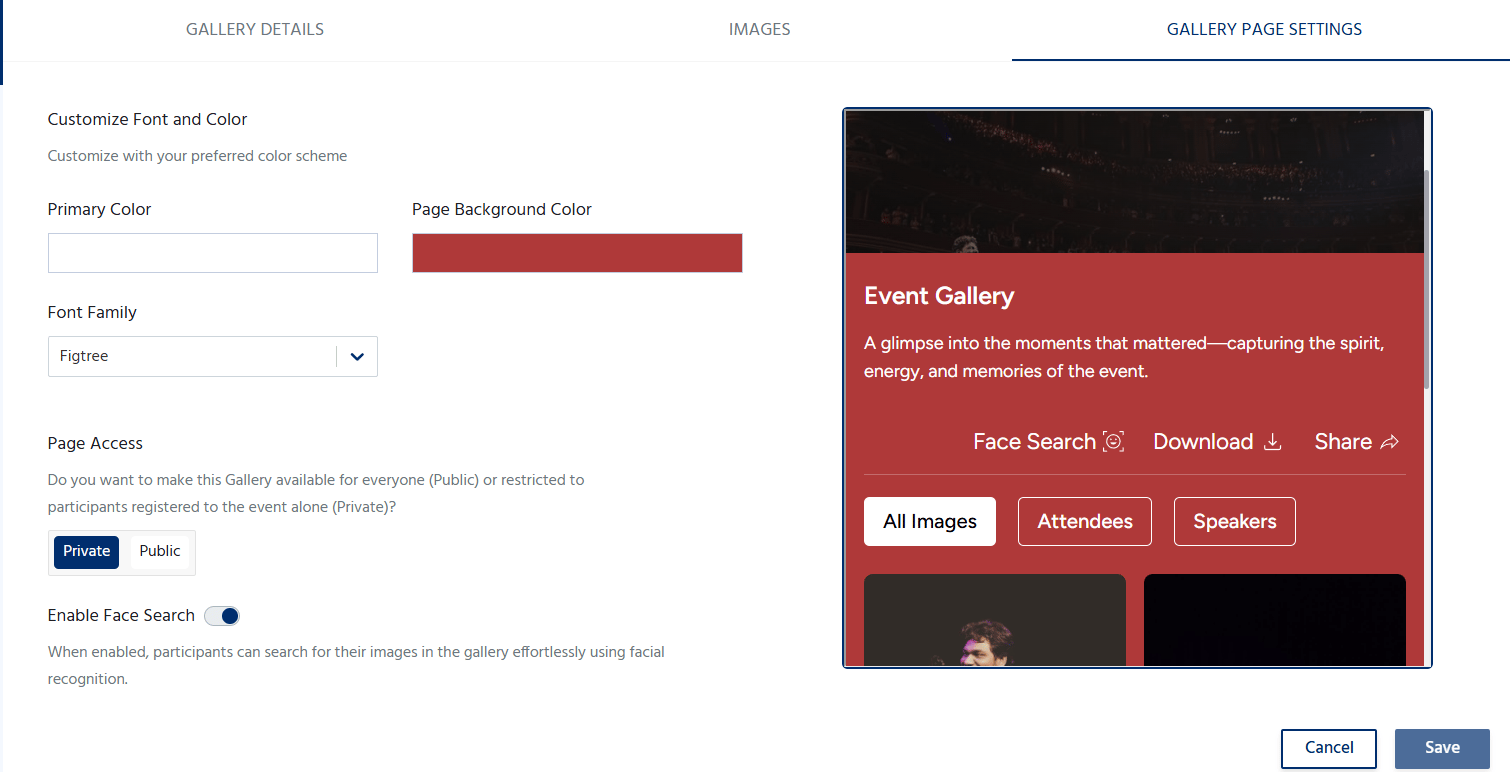
Your gallery should look and feel like your event, not a generic third-party tool. KonfHub's white-labeling options let you apply your full event brand to the gallery experience:
* **Event poster or banner**: Add your event's hero image as the gallery header to create an immediate visual connection
* **Brand colors**: Customize buttons, backgrounds, and accents to match your event's color palette
* **Custom fonts**: Apply your event's typography for a consistent brand experience
* **Event name and description**: Set the gallery title and intro text to match your event's voice
The result is a gallery that attendees recognize as part of your official event experience, reinforcing your brand identity every time a photo is found and shared.
The AI Photo Gallery is available on the **Gold plan**. [View pricing](https://www.konfhub.com/pricing) to upgrade or contact the KonfHub team for a demo.
***
## Why AI Face Recognition Changes Event Photography
Traditional event photo distribution means emailing zip files, posting albums to Google Drive, or hoping attendees tag themselves on social media. None of these approaches scale to thousands of images, and most attendees never find their photos at all.
With KonfHub's AI-powered gallery:
Attendees scan their face once using their device's camera, and the AI matches their face against every uploaded image — returning only the photos they appear in.
Whether you have 200 photos from a workshop or 10,000 from a multi-day conference, the face recognition engine processes every image with the same speed and accuracy.
Attendees access the gallery via a browser link — no download or account creation needed. Just open the URL, scan your face, and view your photos.
Every attendee who finds their photos is one click away from sharing them on social media, creating organic reach and authentic user-generated content for your event brand.
***
## Gallery Features
### AI-Powered Face Recognition
The core of the gallery experience is its face recognition engine. When an attendee opens the gallery and chooses to find their photos, they use their device's camera to capture a quick selfie scan. The AI then searches the entire gallery and returns a personalized collection of images featuring that attendee.
This is particularly powerful for large events:
* A speaker who gave a keynote can instantly find all the stage photography
* An attendee who visited multiple booths can collect every candid shot from the day
* A sponsor's team members can each find their individual photos without digging through thousands of images
Upload photos in batches as the event progresses — during lunch breaks or between sessions — so attendees can start finding and sharing their photos while the event is still live.
***
### Public vs. Private Galleries
You control who can access your gallery. KonfHub gives you two visibility modes:
Anyone with the gallery link can browse and search for photos. Ideal when you want to maximize reach, showcase event highlights publicly, and encourage sharing among attendees and their networks.
Access is restricted to verified attendees only. Visitors must authenticate — typically via their event registration email — before viewing or searching for photos. Ideal for corporate events, exclusive gatherings, or events where data privacy is a priority.
You can switch between public and private modes at any time from your gallery settings, giving you flexibility as your event evolves.
***
### White-Labeling, Branding & Customization
Your gallery should look and feel like your event, not a generic third-party tool. KonfHub's white-labeling options let you apply your full event brand to the gallery experience:
* **Event poster or banner**: Add your event's hero image as the gallery header to create an immediate visual connection
* **Brand colors**: Customize buttons, backgrounds, and accents to match your event's color palette
* **Custom fonts**: Apply your event's typography for a consistent brand experience
* **Event name and description**: Set the gallery title and intro text to match your event's voice
The result is a gallery that attendees recognize as part of your official event experience, reinforcing your brand identity every time a photo is found and shared.
 ***
### Seamless Social Media Sharing
Finding your event photo is only half the experience — sharing it is where the real value for event organizers lies. KonfHub's gallery includes one-click social sharing so attendees can post their photos directly to:
* Instagram
* LinkedIn
* Twitter / X
* Facebook
* WhatsApp
Each share carries your event's branding and gallery link, turning every attendee into an ambassador who drives organic discovery of your event among their professional and personal networks. For recurring events like annual conferences, this social proof builds anticipation for the next edition.
***
## Setting Up Your AI Photo Gallery
Creating and launching your gallery takes four straightforward steps:
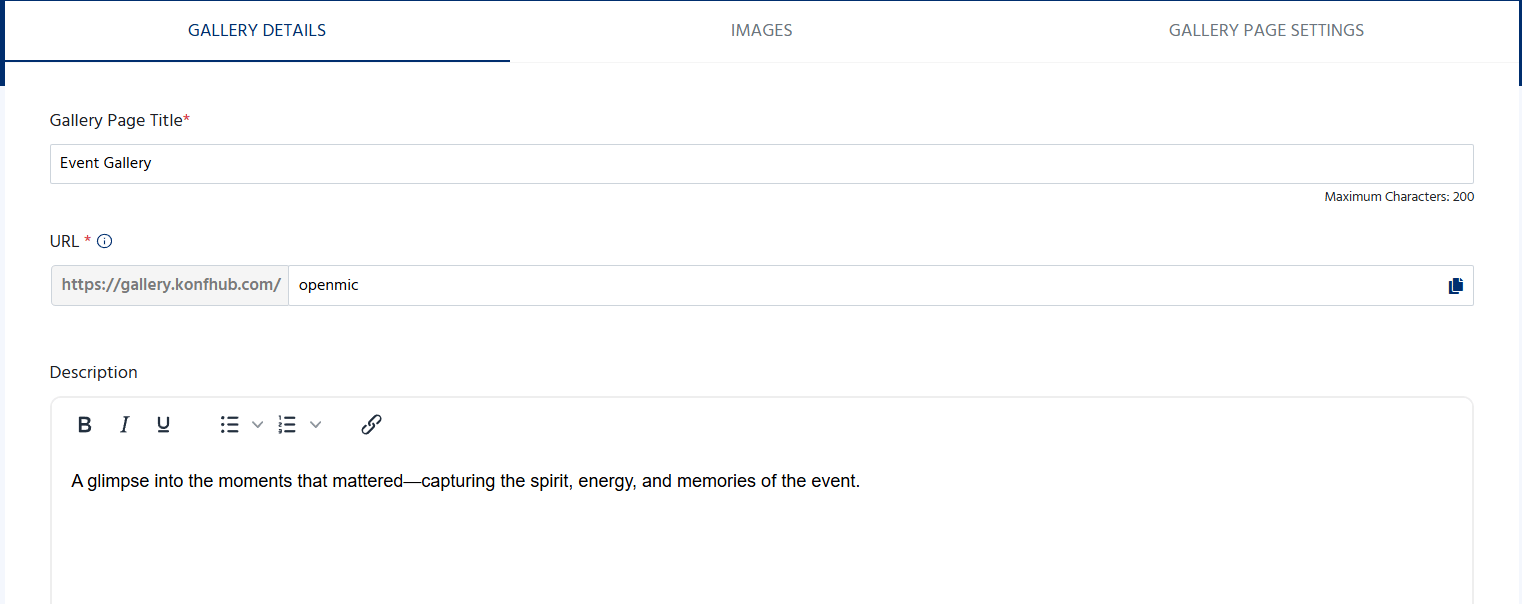
Log in to your KonfHub dashboard and navigate to **Apps & Utilities → AI Photo Gallery**. Click **Create New Gallery**, enter your gallery name, and link it to your event. Your gallery gets a unique URL at `gallery.konfhub.com/your-event-name`.
In the **Branding** tab, upload your event banner, set your brand colors and fonts, and write your gallery description. In the **Access** tab, choose between public and private visibility — and if private, configure how attendees will authenticate (e.g., via their registration email).
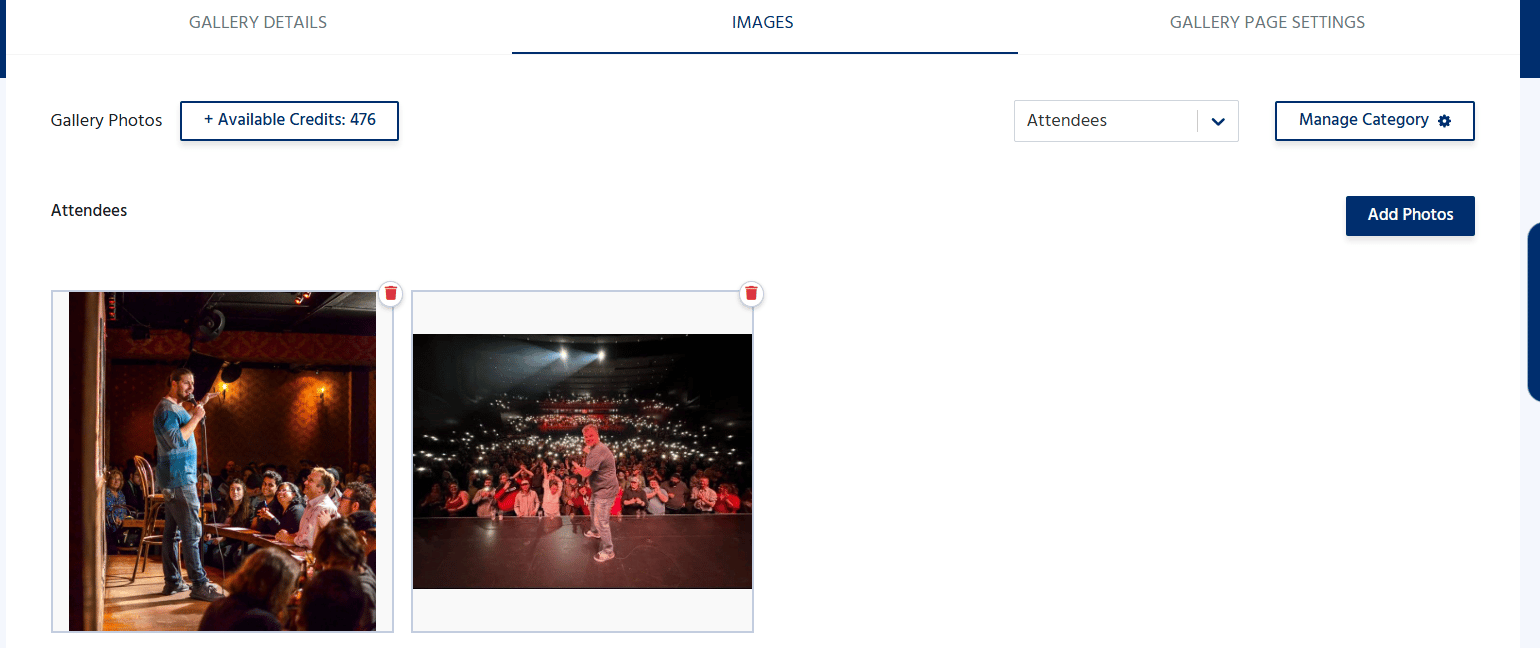
Go to the **Photos** tab and upload your event images. You can upload in bulk using drag-and-drop, organize photos into albums or sessions (e.g., "Day 1 Keynotes," "Networking Dinner," "Workshop Rooms"), and add captions or tags as needed. The AI automatically processes each uploaded image for face recognition.
***
### Seamless Social Media Sharing
Finding your event photo is only half the experience — sharing it is where the real value for event organizers lies. KonfHub's gallery includes one-click social sharing so attendees can post their photos directly to:
* Instagram
* LinkedIn
* Twitter / X
* Facebook
* WhatsApp
Each share carries your event's branding and gallery link, turning every attendee into an ambassador who drives organic discovery of your event among their professional and personal networks. For recurring events like annual conferences, this social proof builds anticipation for the next edition.
***
## Setting Up Your AI Photo Gallery
Creating and launching your gallery takes four straightforward steps:
Log in to your KonfHub dashboard and navigate to **Apps & Utilities → AI Photo Gallery**. Click **Create New Gallery**, enter your gallery name, and link it to your event. Your gallery gets a unique URL at `gallery.konfhub.com/your-event-name`.
In the **Branding** tab, upload your event banner, set your brand colors and fonts, and write your gallery description. In the **Access** tab, choose between public and private visibility — and if private, configure how attendees will authenticate (e.g., via their registration email).
Go to the **Photos** tab and upload your event images. You can upload in bulk using drag-and-drop, organize photos into albums or sessions (e.g., "Day 1 Keynotes," "Networking Dinner," "Workshop Rooms"), and add captions or tags as needed. The AI automatically processes each uploaded image for face recognition.
 Use the **Preview** section to experience the gallery exactly as your attendees will. Once you're satisfied, copy your gallery link and distribute it — via your event app, post-event email, event website, or social media. Attendees open the link, scan their face, and find their photos instantly.
***
## Explore a Live Gallery
See exactly what attendees experience when they open your gallery. Browse the sample gallery from Serverless Days Bengaluru:
[**gallery.konfhub.com/serverlessdaysbengaluru**](https://gallery.konfhub.com/serverlessdaysbengaluru)
This is a real post-event gallery with face recognition enabled — you can explore the interface and photo browsing experience firsthand.
***
## Frequently Asked Questions
No. The gallery is fully web-based and accessible via any modern browser on mobile or desktop. Attendees just open the link you share — no download or account creation required.
When an attendee opens the gallery and chooses to find their photos, they allow their device camera to capture a brief scan of their face. The AI creates a facial signature from that scan and compares it against all the faces detected in your uploaded photos. It returns only the images where that attendee appears, typically within a few seconds.
The facial scan is used only to match against the event photos and is not stored permanently or shared with third parties. KonfHub processes the scan in real time for the purpose of photo retrieval only.
Yes. You can set the gallery to **public** (anyone with the link) or **private** (restricted to verified attendees). Private galleries require attendees to authenticate before accessing photos, ensuring only registered participants can view the content.
You can upload photos at any time — before, during, or after your event. For the best attendee experience, consider uploading in batches throughout the event day so attendees can start finding their photos while the event is still running. The AI processes new uploads automatically.
The AI Photo Gallery is available on the **Gold plan**. Visit [konfhub.com/pricing](https://www.konfhub.com/pricing) to compare plans or contact the KonfHub team to discuss your requirements.
Use the **Preview** section to experience the gallery exactly as your attendees will. Once you're satisfied, copy your gallery link and distribute it — via your event app, post-event email, event website, or social media. Attendees open the link, scan their face, and find their photos instantly.
***
## Explore a Live Gallery
See exactly what attendees experience when they open your gallery. Browse the sample gallery from Serverless Days Bengaluru:
[**gallery.konfhub.com/serverlessdaysbengaluru**](https://gallery.konfhub.com/serverlessdaysbengaluru)
This is a real post-event gallery with face recognition enabled — you can explore the interface and photo browsing experience firsthand.
***
## Frequently Asked Questions
No. The gallery is fully web-based and accessible via any modern browser on mobile or desktop. Attendees just open the link you share — no download or account creation required.
When an attendee opens the gallery and chooses to find their photos, they allow their device camera to capture a brief scan of their face. The AI creates a facial signature from that scan and compares it against all the faces detected in your uploaded photos. It returns only the images where that attendee appears, typically within a few seconds.
The facial scan is used only to match against the event photos and is not stored permanently or shared with third parties. KonfHub processes the scan in real time for the purpose of photo retrieval only.
Yes. You can set the gallery to **public** (anyone with the link) or **private** (restricted to verified attendees). Private galleries require attendees to authenticate before accessing photos, ensuring only registered participants can view the content.
You can upload photos at any time — before, during, or after your event. For the best attendee experience, consider uploading in batches throughout the event day so attendees can start finding their photos while the event is still running. The AI processes new uploads automatically.
The AI Photo Gallery is available on the **Gold plan**. Visit [konfhub.com/pricing](https://www.konfhub.com/pricing) to compare plans or contact the KonfHub team to discuss your requirements.