> ## Documentation Index
> Fetch the complete documentation index at: https://help.konfhub.com/llms.txt
> Use this file to discover all available pages before exploring further.
# Event Details
> Set up your event's basic information, venue, banner, and description.
The Event Details page is where you define the core information about your event - what it's called, when and where it happens, what it looks like, and what attendees will read about it. It has two tabs: **Basic Info** and **About**.
Navigate to **Event Dashboard → Event Info → Event Details** to access this section.
***
## Basic Info
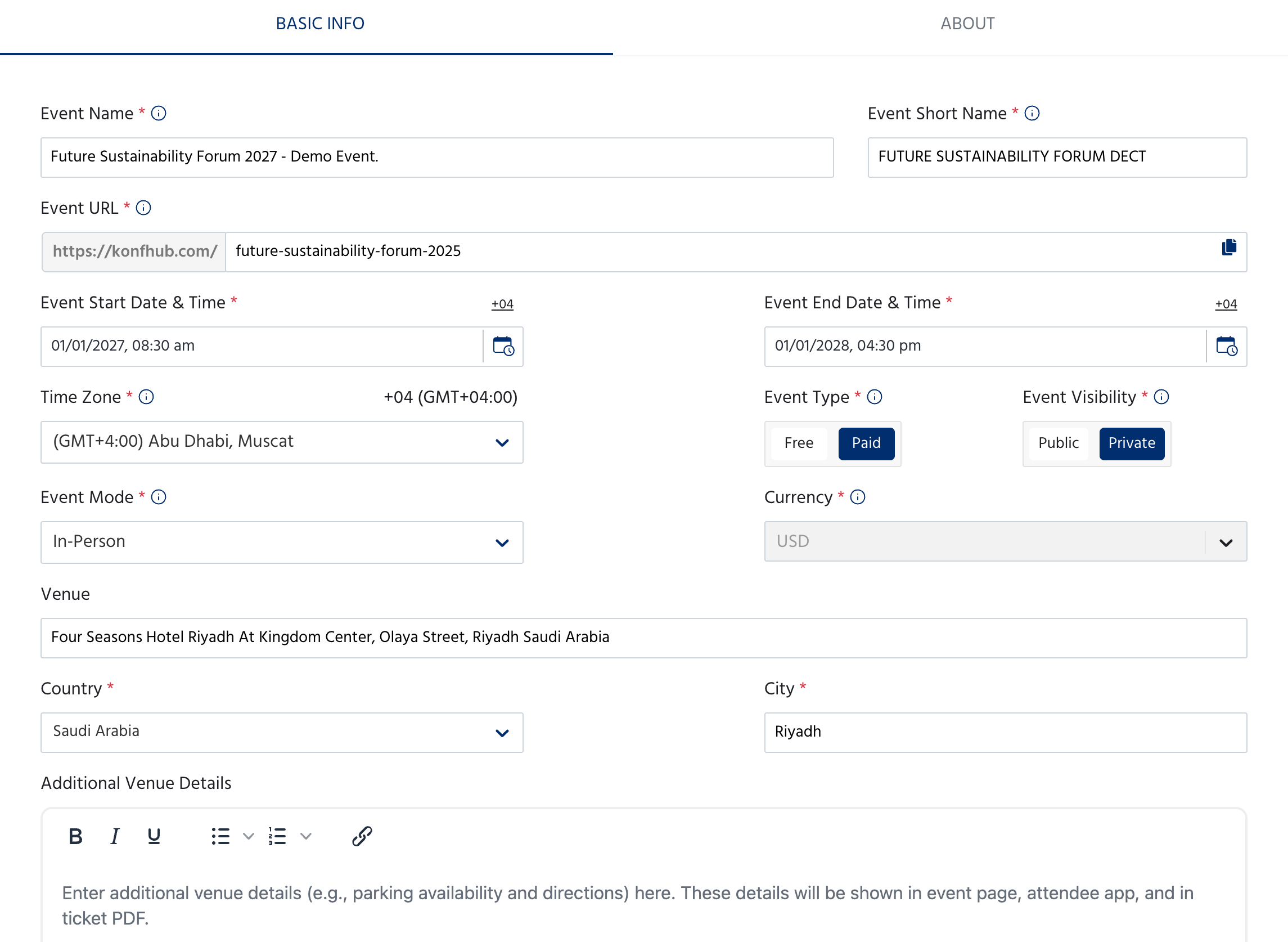
The Basic Info tab covers all the essential details about your event.
 ### Event Identity
| Field | Description |
| -------------------- | ----------------------------------------------------------------------------------------------- |
| **Event Name** | The full name of your event as it appears on the event page and all communications |
| **Event Short Name** | A shorter version of the event name, used in ticket PDFs and compact displays |
| **Event URL** | The public link to your event page on KonfHub — auto-generated from the event name but editable |
Choose your Event URL carefully. Once attendees start registering, changing the URL will break any links you've already shared.
### Date, Time & Location
| Field | Description |
| ---------------------------- | --------------------------------------------------------------------------------------------------------------------------------------------------------- |
| **Event Start Date & Time** | The date and time your event begins |
| **Event End Date & Time** | The date and time your event ends |
| **Time Zone** | The time zone your event runs in — all times displayed to attendees will use this |
| **Event Mode** | **In-Person**, **Online**, or **Hybrid** |
| **Venue** | The full venue name and address (shown on the event page, attendee app, and ticket PDF) |
| **Country** | Country where the event is taking place |
| **City** | City where the event is taking place |
| **Additional Venue Details** | A rich text field for extra venue information such as parking, directions, or access instructions — shown on the event page, attendee app, and ticket PDF |
### Event Settings
| Field | Description |
| -------------------- | ------------------------------------------------------------------------------------------------ |
| **Event Type** | **Free** (no charge) or **Paid** (ticket revenue collected) |
| **Event Visibility** | **Public** (listed on KonfHub and discoverable) or **Private** (accessible via direct link only) |
| **Currency** | The currency used for ticket pricing — set automatically based on your region |
### Event Banner
### Event Identity
| Field | Description |
| -------------------- | ----------------------------------------------------------------------------------------------- |
| **Event Name** | The full name of your event as it appears on the event page and all communications |
| **Event Short Name** | A shorter version of the event name, used in ticket PDFs and compact displays |
| **Event URL** | The public link to your event page on KonfHub — auto-generated from the event name but editable |
Choose your Event URL carefully. Once attendees start registering, changing the URL will break any links you've already shared.
### Date, Time & Location
| Field | Description |
| ---------------------------- | --------------------------------------------------------------------------------------------------------------------------------------------------------- |
| **Event Start Date & Time** | The date and time your event begins |
| **Event End Date & Time** | The date and time your event ends |
| **Time Zone** | The time zone your event runs in — all times displayed to attendees will use this |
| **Event Mode** | **In-Person**, **Online**, or **Hybrid** |
| **Venue** | The full venue name and address (shown on the event page, attendee app, and ticket PDF) |
| **Country** | Country where the event is taking place |
| **City** | City where the event is taking place |
| **Additional Venue Details** | A rich text field for extra venue information such as parking, directions, or access instructions — shown on the event page, attendee app, and ticket PDF |
### Event Settings
| Field | Description |
| -------------------- | ------------------------------------------------------------------------------------------------ |
| **Event Type** | **Free** (no charge) or **Paid** (ticket revenue collected) |
| **Event Visibility** | **Public** (listed on KonfHub and discoverable) or **Private** (accessible via direct link only) |
| **Currency** | The currency used for ticket pricing — set automatically based on your region |
### Event Banner
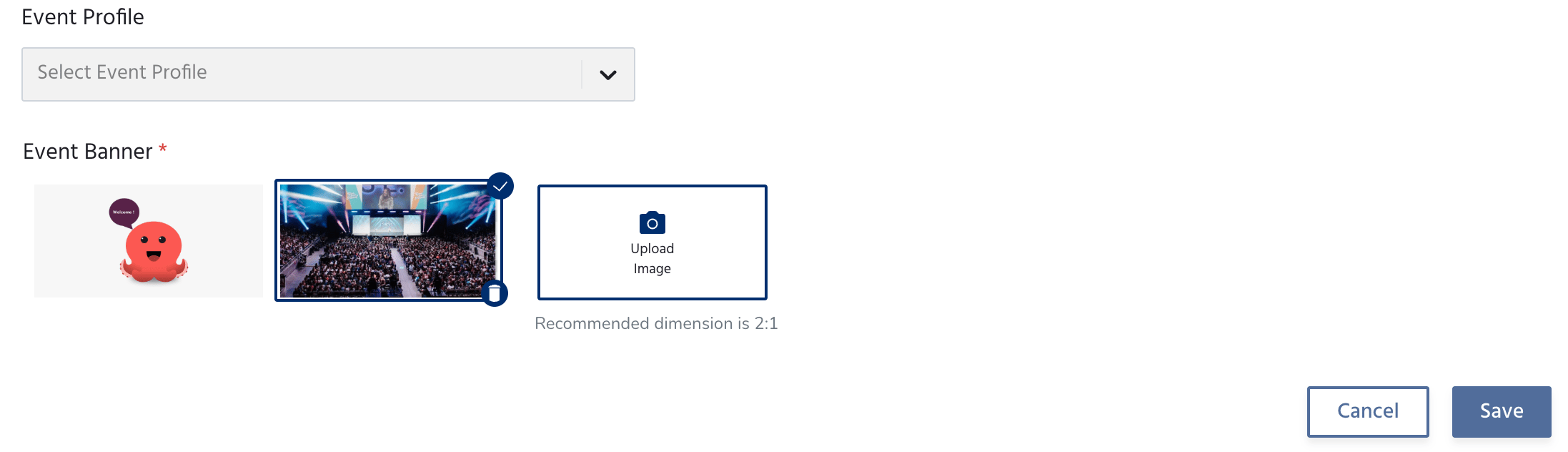 | Field | Description |
| ----------------- | -------------------------------------------------------------------------------------------- |
| **Event Profile** | Select a pre-configured event profile if you have one set up |
| **Event Banner** | The main image shown on your event page — choose from the default options or upload your own |
The recommended banner dimension is **2:1** (for example, 1200 × 600 px). Use a high-resolution image for the best appearance across devices.
Click **Save** to apply your changes, or **Cancel** to discard them.
***
## About
The About tab is where you tell attendees what your event is about. This content appears on your public event page.
| Field | Description |
| ----------------- | -------------------------------------------------------------------------------------------- |
| **Event Profile** | Select a pre-configured event profile if you have one set up |
| **Event Banner** | The main image shown on your event page — choose from the default options or upload your own |
The recommended banner dimension is **2:1** (for example, 1200 × 600 px). Use a high-resolution image for the best appearance across devices.
Click **Save** to apply your changes, or **Cancel** to discard them.
***
## About
The About tab is where you tell attendees what your event is about. This content appears on your public event page.
 ### Description
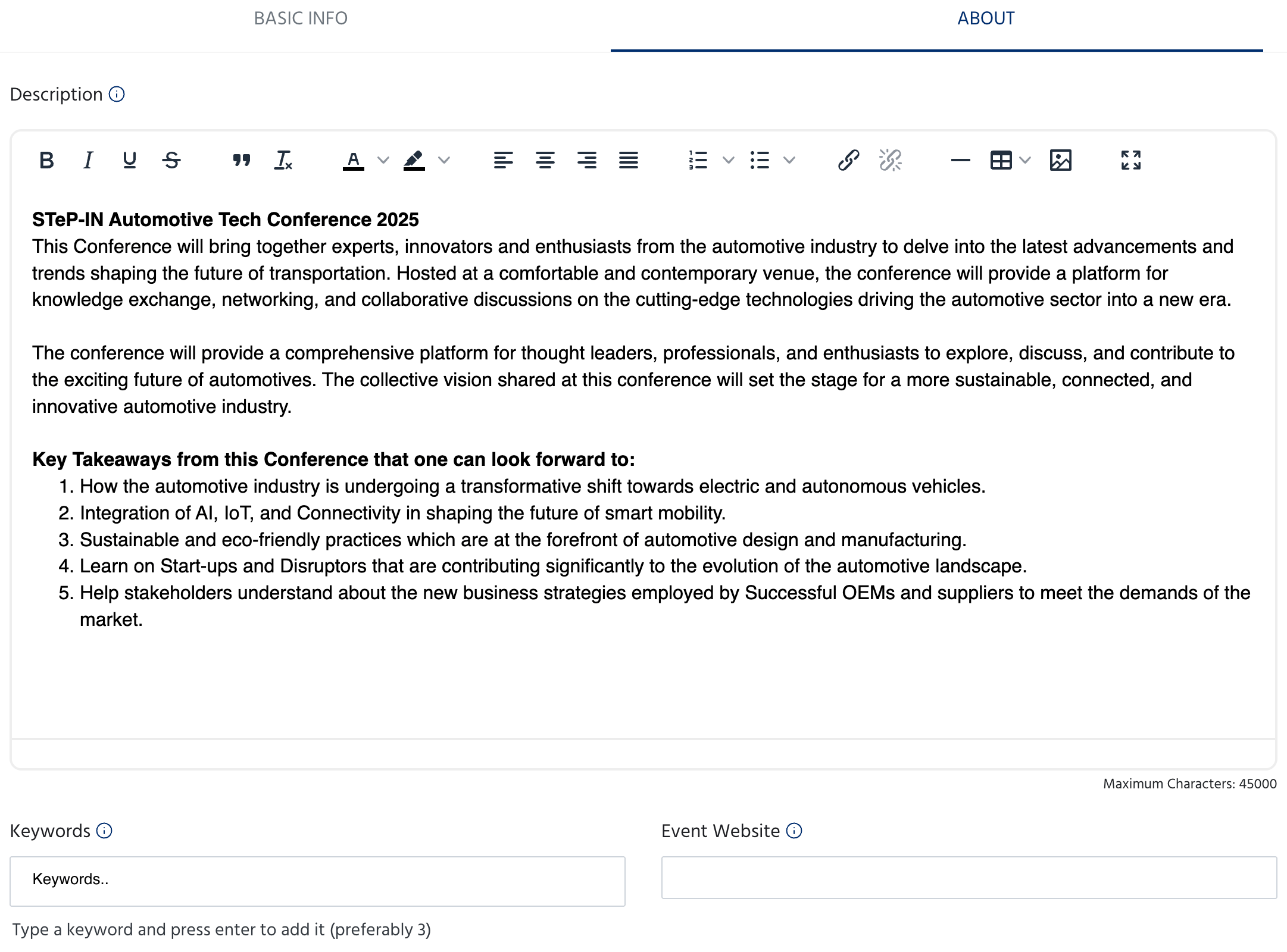
A full rich text editor where you can write your event description. You can use bold, italic, underline, strikethrough, headings, bullet lists, numbered lists, tables, images, and links.
Use this space to cover:
* What the event is about
* Who it is for
* Key topics, sessions, or highlights
* What attendees can expect to take away
The description has a maximum of **45,000 characters**.
### Keywords & Website
| Field | Description |
| ----------------- | ------------------------------------------------------------------------------------------------------------------------------- |
| **Keywords** | Add up to 3 keywords that describe your event — helps with discoverability on KonfHub. Type a keyword and press Enter to add it |
| **Event Website** | Link to your external event website if you have one separate from the KonfHub event page |
### Expected Speakers & Participants
### Description
A full rich text editor where you can write your event description. You can use bold, italic, underline, strikethrough, headings, bullet lists, numbered lists, tables, images, and links.
Use this space to cover:
* What the event is about
* Who it is for
* Key topics, sessions, or highlights
* What attendees can expect to take away
The description has a maximum of **45,000 characters**.
### Keywords & Website
| Field | Description |
| ----------------- | ------------------------------------------------------------------------------------------------------------------------------- |
| **Keywords** | Add up to 3 keywords that describe your event — helps with discoverability on KonfHub. Type a keyword and press Enter to add it |
| **Event Website** | Link to your external event website if you have one separate from the KonfHub event page |
### Expected Speakers & Participants
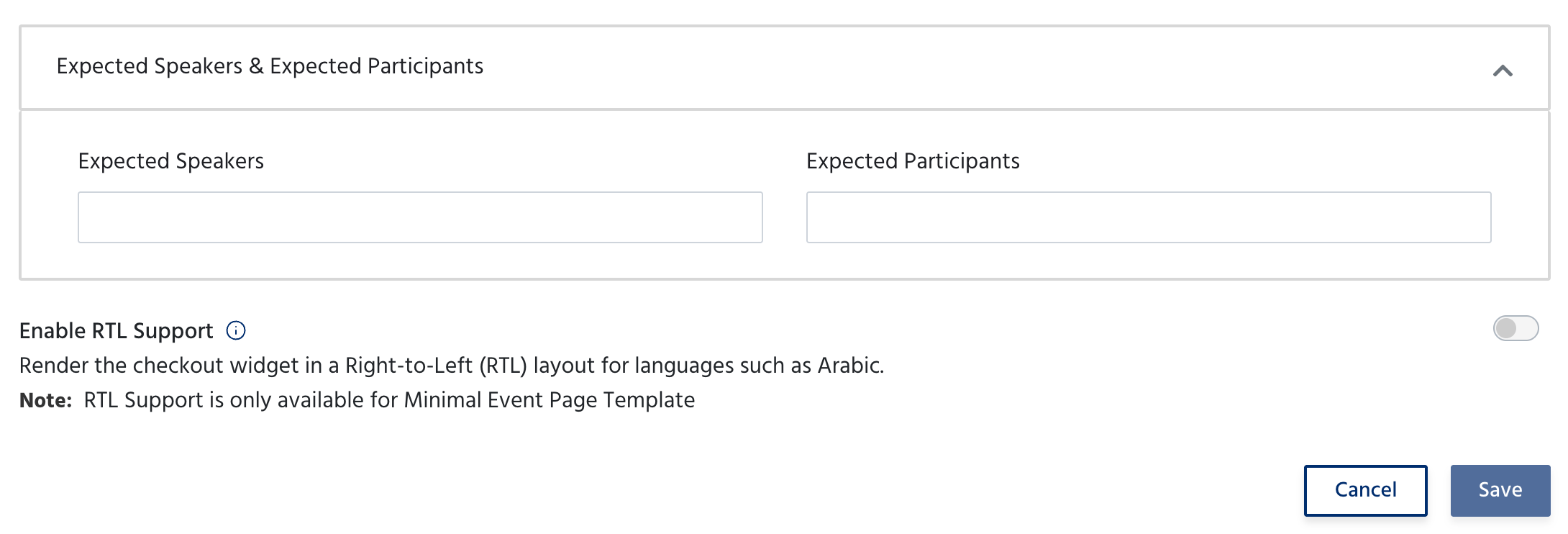 | Field | Description |
| ------------------------- | ------------------------------------------------------------------------------------------------- |
| **Expected Speakers** | The number of speakers you expect at the event — shown on the event page as a signal to attendees |
| **Expected Participants** | The total number of attendees you expect — also shown on the event page |
### RTL Support
If your event content is in a right-to-left language such as Arabic, toggle **Enable RTL Support** to render the checkout widget in RTL layout.
RTL Support is only available for the **Minimal Event Page Template**.
Click **Save** to apply your changes, or **Cancel** to discard them.
***
## Next Steps
Once your event details are saved, move on to setting up tickets and your registration form:
Create ticket types, set pricing, capacity, and availability windows.\\
Customise the registration form attendees fill out when signing up for your event.
| Field | Description |
| ------------------------- | ------------------------------------------------------------------------------------------------- |
| **Expected Speakers** | The number of speakers you expect at the event — shown on the event page as a signal to attendees |
| **Expected Participants** | The total number of attendees you expect — also shown on the event page |
### RTL Support
If your event content is in a right-to-left language such as Arabic, toggle **Enable RTL Support** to render the checkout widget in RTL layout.
RTL Support is only available for the **Minimal Event Page Template**.
Click **Save** to apply your changes, or **Cancel** to discard them.
***
## Next Steps
Once your event details are saved, move on to setting up tickets and your registration form:
Create ticket types, set pricing, capacity, and availability windows.\\
Customise the registration form attendees fill out when signing up for your event.