> ## Documentation Index
> Fetch the complete documentation index at: https://help.konfhub.com/llms.txt
> Use this file to discover all available pages before exploring further.
# KonfHub Event Overview
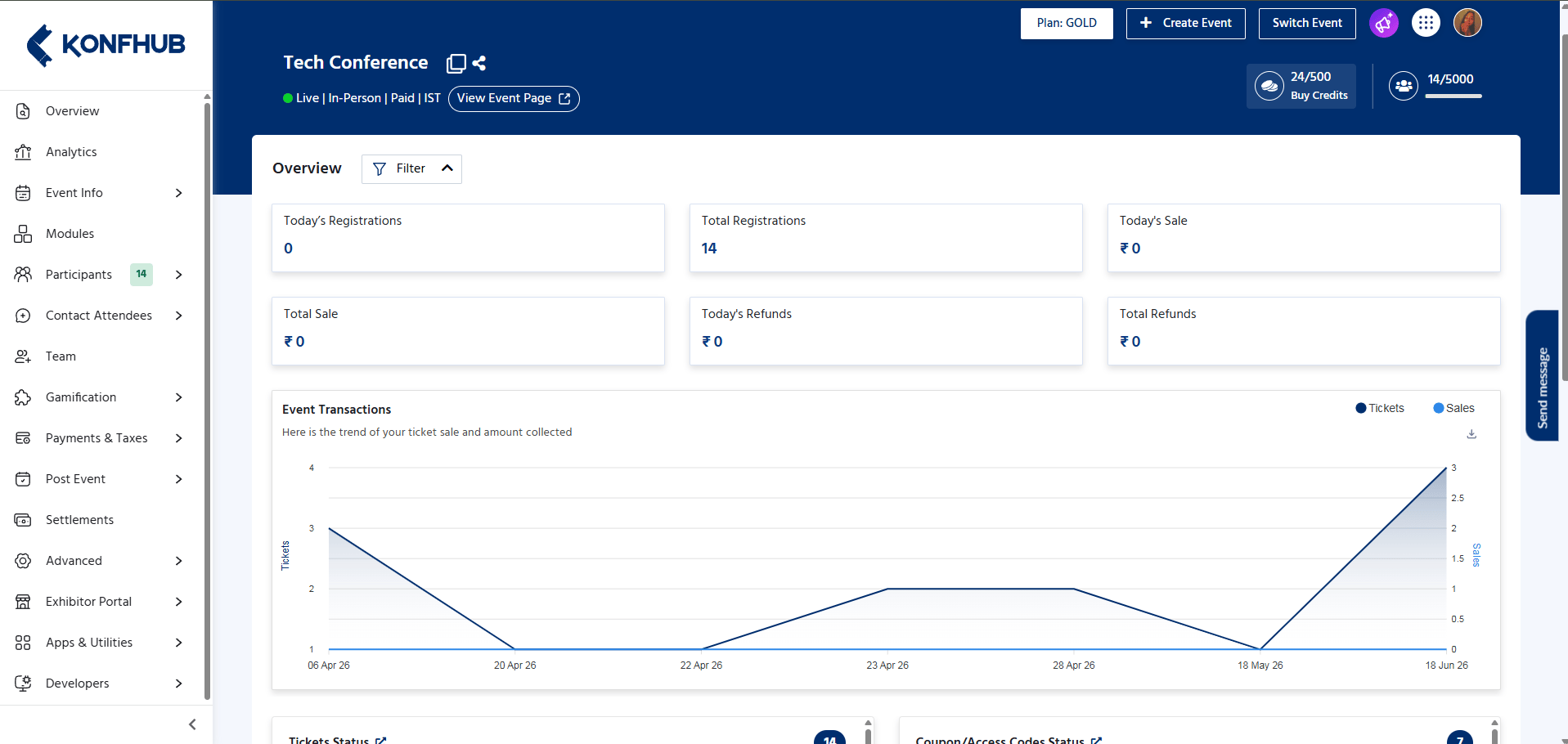
> When you first open your event dashboard, you land on the Overview panel. This panel gives you an at-a-glance summary of your event's health:
* **Today's Registrations** – Number of registrations received on the current day.
* **Total Registrations** – Total number of registrations received for the event.
* **Today's Sale** – Revenue generated from registrations on the current day.
* **Total Sale** – Total revenue collected for the event.
* **Today's Refunds** – Refund amount processed on the current day.
* **Total Refunds** – Total refund amount processed for the event.
These metrics help organizers track event performance in real time.
 ### Ticket Status, Coupon Status & Recent Transactions
The lower section of the **Overview Dashboard** provides detailed insights into ticket availability, coupon usage, and recent registrations.
#### Ticket Status
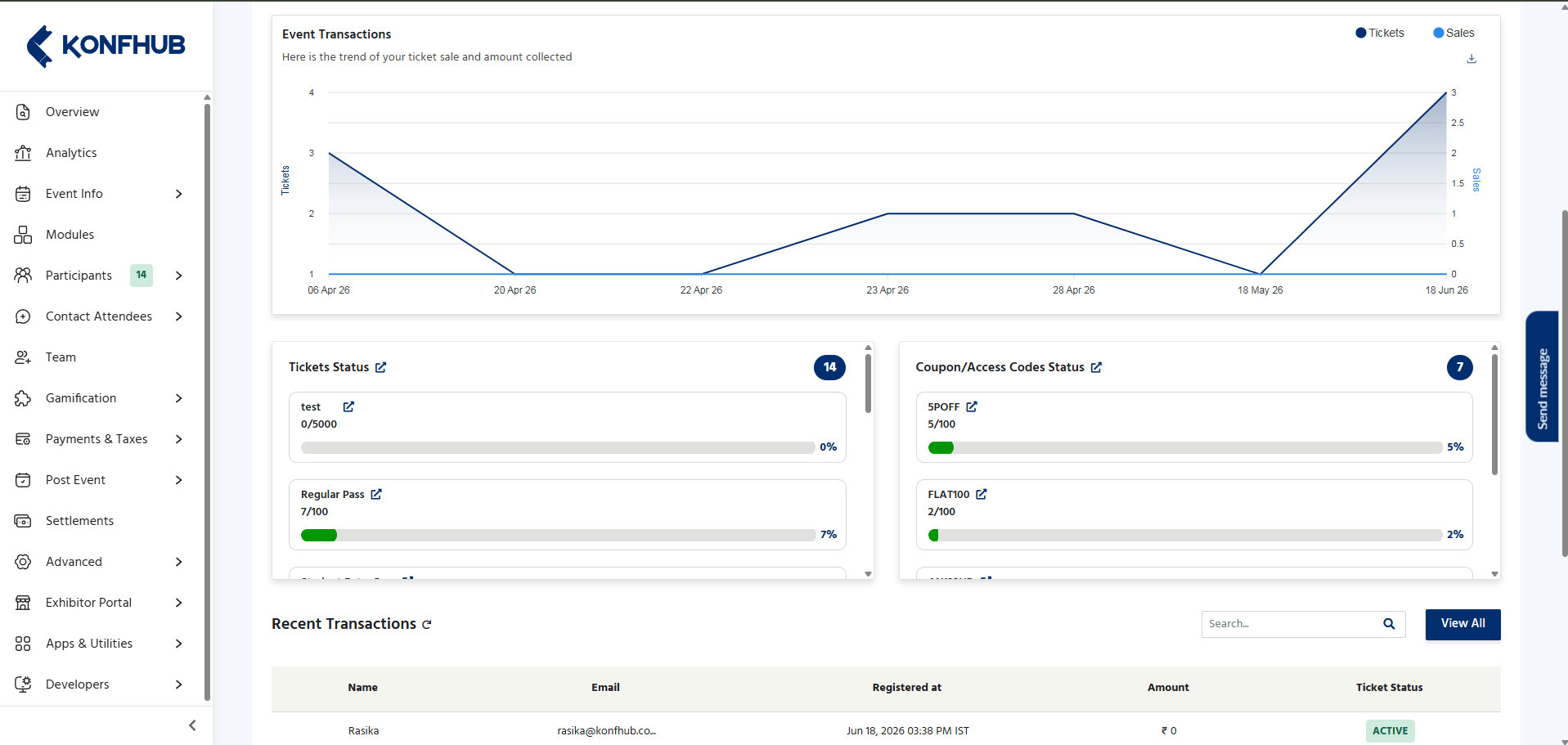
The **Ticket Status** widget displays all ticket types created for the event along with their utilization status.
For each ticket, the following information is shown:
* **Ticket Name** – Name of the ticket category.
* **Tickets Sold / Available** – Number of tickets sold out of the total ticket quantity.
* **Progress Bar** – Visual representation of ticket consumption.
* **Utilization Percentage** – Percentage of tickets sold.
This section helps organizers monitor ticket inventory and identify which ticket categories are performing well.
#### Coupon / Access Codes Status
The **Coupon/Access Codes Status** widget displays the usage statistics of coupon codes and access codes configured for the event.
For each code, the following details are available:
* **Coupon / Access Code Name**
* **Usage Count** – Number of times the code has been used.
* **Maximum Usage Limit**
* **Progress Bar** – Visual representation of code utilization.
* **Usage Percentage**
This allows organizers to track the effectiveness and usage of promotional or restricted-access codes.
#### Recent Transactions
The **Recent Transactions** table provides a quick overview of the latest registrations and ticket purchases.
### Ticket Status, Coupon Status & Recent Transactions
The lower section of the **Overview Dashboard** provides detailed insights into ticket availability, coupon usage, and recent registrations.
#### Ticket Status
The **Ticket Status** widget displays all ticket types created for the event along with their utilization status.
For each ticket, the following information is shown:
* **Ticket Name** – Name of the ticket category.
* **Tickets Sold / Available** – Number of tickets sold out of the total ticket quantity.
* **Progress Bar** – Visual representation of ticket consumption.
* **Utilization Percentage** – Percentage of tickets sold.
This section helps organizers monitor ticket inventory and identify which ticket categories are performing well.
#### Coupon / Access Codes Status
The **Coupon/Access Codes Status** widget displays the usage statistics of coupon codes and access codes configured for the event.
For each code, the following details are available:
* **Coupon / Access Code Name**
* **Usage Count** – Number of times the code has been used.
* **Maximum Usage Limit**
* **Progress Bar** – Visual representation of code utilization.
* **Usage Percentage**
This allows organizers to track the effectiveness and usage of promotional or restricted-access codes.
#### Recent Transactions
The **Recent Transactions** table provides a quick overview of the latest registrations and ticket purchases.
 #### Purpose
These sections help organizers:
* Monitor ticket sales and availability.
* Track coupon and access code usage.
* Review recent registrations and transactions.
* Quickly identify ticket and promotional code performance.
Bookmark your event dashboard URL so you can jump straight to your command center without navigating through the events list each time.
Plans are per event, not per account. You can choose a different plan for each event you create on KonfHub. [View full pricing](https://www.konfhub.com/pricing).
#### Purpose
These sections help organizers:
* Monitor ticket sales and availability.
* Track coupon and access code usage.
* Review recent registrations and transactions.
* Quickly identify ticket and promotional code performance.
Bookmark your event dashboard URL so you can jump straight to your command center without navigating through the events list each time.
Plans are per event, not per account. You can choose a different plan for each event you create on KonfHub. [View full pricing](https://www.konfhub.com/pricing).