> ## Documentation Index
> Fetch the complete documentation index at: https://help.konfhub.com/llms.txt
> Use this file to discover all available pages before exploring further.
# KonfHub Webhooks: Real-Time Attendee Event Notifications
> Configure KonfHub webhooks to receive real-time HTTP POST notifications for registrations, cancellations, check-ins, checkouts, and lead capture.
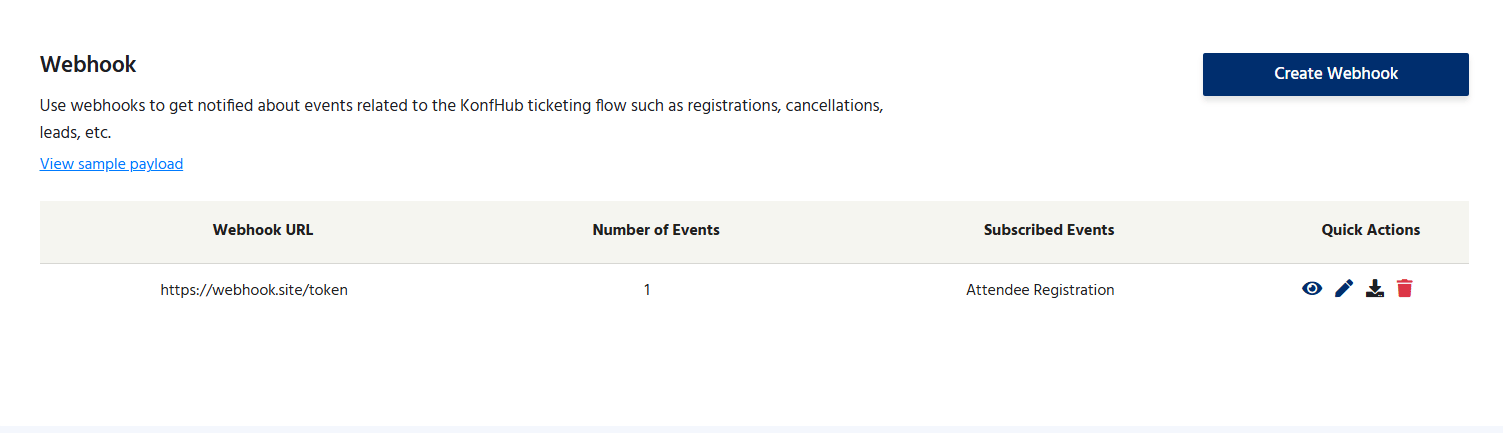
Webhooks let your systems react to KonfHub events the moment they happen. Instead of polling the KonfHub API for updates, you provide a URL on your server and KonfHub sends an HTTP POST request to that URL whenever a specified event occurs — a new registration, a cancellation, a check-in, and more. This makes it straightforward to keep your CRM, databases, email tools, and spreadsheets in perfect sync with your event's live data, without building any scheduled jobs or polling mechanisms.
 ***
## Supported Webhook Events
KonfHub can notify your endpoint for the following event types. You choose which events trigger your webhook when you configure it.
Fires when a new attendee successfully completes registration for your event. Includes full attendee details and ticket information.
Fires when an attendee cancels their registration. Use this to update your CRM, free up reserved resources, or trigger a follow-up workflow.
Fires when an attendee is checked in at the venue using the KonfHub Check-in App. Useful for real-time attendance tracking dashboards.
Fires when an attendee checks out of the venue. Helps track session attendance duration and manage capacity in multi-area events.
Fires when a lead is captured for your event through the Lead Capture App. Use this to immediately push lead data into your sales pipeline.
***
## Configuring a Webhook
Log in to KonfHub, select your event, and navigate to the **Developers** section in the left-hand sidebar.
Click on **Webhooks** within the Developers section. You will see the webhook configuration panel.
Paste the URL of the endpoint on your server where KonfHub should send POST requests. Make sure the endpoint is publicly accessible and returns a `200 OK` response when it receives a request.
Check the boxes next to each event type you want to receive notifications for: Attendee Registration, Attendee Cancellation, Check-In, Check-Out, and/or Lead Generation.
Save your configuration. KonfHub will begin sending POST requests to your URL immediately when the selected events occur. Use a tool like [Webhook.site](https://webhook.site) to test and inspect the payload before connecting to your production system.
Your webhook endpoint must be **publicly reachable over HTTPS** and must respond with an HTTP `200 OK` status. Endpoints behind a firewall, on localhost, or returning error codes will not receive webhook deliveries reliably.
***
## Webhook Payload Structure
KonfHub sends webhook notifications as HTTP `POST` requests with a `Content-Type: application/json` header. Below is an example payload for an **Attendee Registration** event:
```json theme={null}
{
"event": "attendee.registered",
"data": {
"attendee_id": "att_abc123",
"name": "Jane Doe",
"email": "jane@example.com",
"ticket_type": "General Admission",
"registered_at": "2025-06-15T10:30:00Z"
}
}
```
### Example: Attendee Cancellation
```json theme={null}
{
"event": "attendee.cancelled",
"data": {
"attendee_id": "att_abc123",
"name": "Jane Doe",
"email": "jane@example.com",
"ticket_type": "General Admission",
"cancelled_at": "2025-06-16T08:15:00Z"
}
}
```
### Example: Check-In
```json theme={null}
{
"event": "attendee.checked_in",
"data": {
"attendee_id": "att_abc123",
"name": "Jane Doe",
"email": "jane@example.com",
"ticket_type": "General Admission",
"checked_in_at": "2025-06-20T09:05:00Z",
"gate": "Main Entrance"
}
}
```
### Example: Lead Generation
```json theme={null}
{
"event": "lead.generated",
"data": {
"lead_id": "lead_xyz789",
"name": "Ravi Kumar",
"email": "ravi@company.com",
"phone": "+91-9876543210",
"captured_by": "exhibitor_booth_3",
"captured_at": "2025-06-20T11:30:00Z"
}
}
```
Always parse the `event` field first to determine the notification type before processing `data`. This makes your webhook handler resilient to new event types being added in the future.
***
## Example Use Cases
Webhooks are the foundation for real-time integrations between KonfHub and the rest of your event stack. Here are some common patterns:
When a new `attendee.registered` event arrives, parse the attendee's name, email, and ticket type, then call your CRM's API (e.g., HubSpot, Salesforce) to create or update a contact record. This eliminates manual CSV exports and import delays.
Trigger your own messaging workflow on every `attendee.registered` event. Route the payload to your SMS provider (e.g., Twilio), transactional email service (e.g., SendGrid), or WhatsApp Business API to send a branded confirmation message outside of KonfHub's standard communications.
Forward `attendee.checked_in` and `attendee.checked_out` events to a Google Sheets or Airtable automation to maintain a live attendance log. Pair this with a dashboard for a real-time view of who is on-site.
When a `lead.generated` event fires, immediately create a deal or opportunity in your CRM and assign it to the appropriate sales representative. This ensures no lead captured at your event booth goes cold.
Send a message to your event operations Slack channel every time a new VIP or speaker registers. Filter on ticket type in your webhook handler and only notify your team for specific registrations.
***
## Retry Behavior and Reliability
KonfHub makes a best-effort delivery of webhook notifications. If your endpoint returns a non-`200` status code or is unreachable, KonfHub will retry the request automatically a set number of times with an exponential back-off delay.
To ensure reliable delivery, design your webhook endpoint to be **idempotent** — processing the same payload more than once should not cause duplicate records or unintended side effects. Use the `attendee_id` or `lead_id` fields as idempotency keys.
***
## Plan Availability
Webhooks are available on the **Silver plan and above**.
| Plan | Webhooks |
| -------- | -------- |
| Freemium | ❌ |
| Lite | ❌ |
| Silver | ✅ |
| Gold | ✅ |
To upgrade your plan, visit [konfhub.com/pricing](https://www.konfhub.com/pricing) or contact the KonfHub sales team.
***
## Supported Webhook Events
KonfHub can notify your endpoint for the following event types. You choose which events trigger your webhook when you configure it.
Fires when a new attendee successfully completes registration for your event. Includes full attendee details and ticket information.
Fires when an attendee cancels their registration. Use this to update your CRM, free up reserved resources, or trigger a follow-up workflow.
Fires when an attendee is checked in at the venue using the KonfHub Check-in App. Useful for real-time attendance tracking dashboards.
Fires when an attendee checks out of the venue. Helps track session attendance duration and manage capacity in multi-area events.
Fires when a lead is captured for your event through the Lead Capture App. Use this to immediately push lead data into your sales pipeline.
***
## Configuring a Webhook
Log in to KonfHub, select your event, and navigate to the **Developers** section in the left-hand sidebar.
Click on **Webhooks** within the Developers section. You will see the webhook configuration panel.
Paste the URL of the endpoint on your server where KonfHub should send POST requests. Make sure the endpoint is publicly accessible and returns a `200 OK` response when it receives a request.
Check the boxes next to each event type you want to receive notifications for: Attendee Registration, Attendee Cancellation, Check-In, Check-Out, and/or Lead Generation.
Save your configuration. KonfHub will begin sending POST requests to your URL immediately when the selected events occur. Use a tool like [Webhook.site](https://webhook.site) to test and inspect the payload before connecting to your production system.
Your webhook endpoint must be **publicly reachable over HTTPS** and must respond with an HTTP `200 OK` status. Endpoints behind a firewall, on localhost, or returning error codes will not receive webhook deliveries reliably.
***
## Webhook Payload Structure
KonfHub sends webhook notifications as HTTP `POST` requests with a `Content-Type: application/json` header. Below is an example payload for an **Attendee Registration** event:
```json theme={null}
{
"event": "attendee.registered",
"data": {
"attendee_id": "att_abc123",
"name": "Jane Doe",
"email": "jane@example.com",
"ticket_type": "General Admission",
"registered_at": "2025-06-15T10:30:00Z"
}
}
```
### Example: Attendee Cancellation
```json theme={null}
{
"event": "attendee.cancelled",
"data": {
"attendee_id": "att_abc123",
"name": "Jane Doe",
"email": "jane@example.com",
"ticket_type": "General Admission",
"cancelled_at": "2025-06-16T08:15:00Z"
}
}
```
### Example: Check-In
```json theme={null}
{
"event": "attendee.checked_in",
"data": {
"attendee_id": "att_abc123",
"name": "Jane Doe",
"email": "jane@example.com",
"ticket_type": "General Admission",
"checked_in_at": "2025-06-20T09:05:00Z",
"gate": "Main Entrance"
}
}
```
### Example: Lead Generation
```json theme={null}
{
"event": "lead.generated",
"data": {
"lead_id": "lead_xyz789",
"name": "Ravi Kumar",
"email": "ravi@company.com",
"phone": "+91-9876543210",
"captured_by": "exhibitor_booth_3",
"captured_at": "2025-06-20T11:30:00Z"
}
}
```
Always parse the `event` field first to determine the notification type before processing `data`. This makes your webhook handler resilient to new event types being added in the future.
***
## Example Use Cases
Webhooks are the foundation for real-time integrations between KonfHub and the rest of your event stack. Here are some common patterns:
When a new `attendee.registered` event arrives, parse the attendee's name, email, and ticket type, then call your CRM's API (e.g., HubSpot, Salesforce) to create or update a contact record. This eliminates manual CSV exports and import delays.
Trigger your own messaging workflow on every `attendee.registered` event. Route the payload to your SMS provider (e.g., Twilio), transactional email service (e.g., SendGrid), or WhatsApp Business API to send a branded confirmation message outside of KonfHub's standard communications.
Forward `attendee.checked_in` and `attendee.checked_out` events to a Google Sheets or Airtable automation to maintain a live attendance log. Pair this with a dashboard for a real-time view of who is on-site.
When a `lead.generated` event fires, immediately create a deal or opportunity in your CRM and assign it to the appropriate sales representative. This ensures no lead captured at your event booth goes cold.
Send a message to your event operations Slack channel every time a new VIP or speaker registers. Filter on ticket type in your webhook handler and only notify your team for specific registrations.
***
## Retry Behavior and Reliability
KonfHub makes a best-effort delivery of webhook notifications. If your endpoint returns a non-`200` status code or is unreachable, KonfHub will retry the request automatically a set number of times with an exponential back-off delay.
To ensure reliable delivery, design your webhook endpoint to be **idempotent** — processing the same payload more than once should not cause duplicate records or unintended side effects. Use the `attendee_id` or `lead_id` fields as idempotency keys.
***
## Plan Availability
Webhooks are available on the **Silver plan and above**.
| Plan | Webhooks |
| -------- | -------- |
| Freemium | ❌ |
| Lite | ❌ |
| Silver | ✅ |
| Gold | ✅ |
To upgrade your plan, visit [konfhub.com/pricing](https://www.konfhub.com/pricing) or contact the KonfHub sales team.