Setting Up the Event App
Once your event is on the Gold plan, activate the Event App from your event dashboard. Attendee and speaker data that’s already in KonfHub populates the app automatically — you don’t need to re-upload any information. Configure your branding, add custom modules, and share the app link with your attendees before the event begins.The Event App is available on the Gold plan. View pricing to upgrade, or contact the KonfHub team to discuss your requirements.
Networking Features
The networking module is the heart of the Event App. It gives every attendee a rich profile and the tools to find and connect with the right people at your event.Attendee Profiles
Each attendee gets a profile that showcases:- Name, photo, and contact details
- Professional role, company, and areas of expertise
- Interests to help surface relevant connections
- Social media links so new contacts can follow up after the event
Business Card Exchange Via QR Code
Every attendee profile includes a personal QR code that acts as a digital business card. To exchange contact details, two attendees simply scan each other’s codes. No paper cards needed, no manual data entry — contact information moves instantly into each person’s connection list and remains accessible after the event.Connection Requests
Attendees can send and accept connection requests within the app. Once connected, both parties have access to each other’s shared contact details. Attendees retain full control over what information appears on their digital business card, and connections can be removed at any time.Chat
The in-app chat feature enables real-time text conversations between any participants in the event — attendees, speakers, and organizers included.Attendee-to-Attendee Messaging
Start a direct conversation with any other registered attendee. Exchange ideas, follow up on a session, or arrange an impromptu coffee meeting — all without leaving the app.
Speaker and Organizer Communication
Attendees can message speakers or event organizers directly, and organizers can broadcast important updates to the whole group via chat.
Meeting Scheduling
The Meetings feature lets attendees schedule structured one-on-one meetings with each other directly inside the app. Attendees browse profiles, identify people they want to meet — whether by role, expertise, or shared interests — and send a meeting request. The other party accepts or proposes an alternative slot. Confirmed meetings appear in the attendee’s personal schedule alongside the event agenda. Combined with attendee profiles and chat, the Meetings feature turns your event into a high-value networking opportunity where connections happen intentionally, not just by chance.Event Information at Your Fingertips
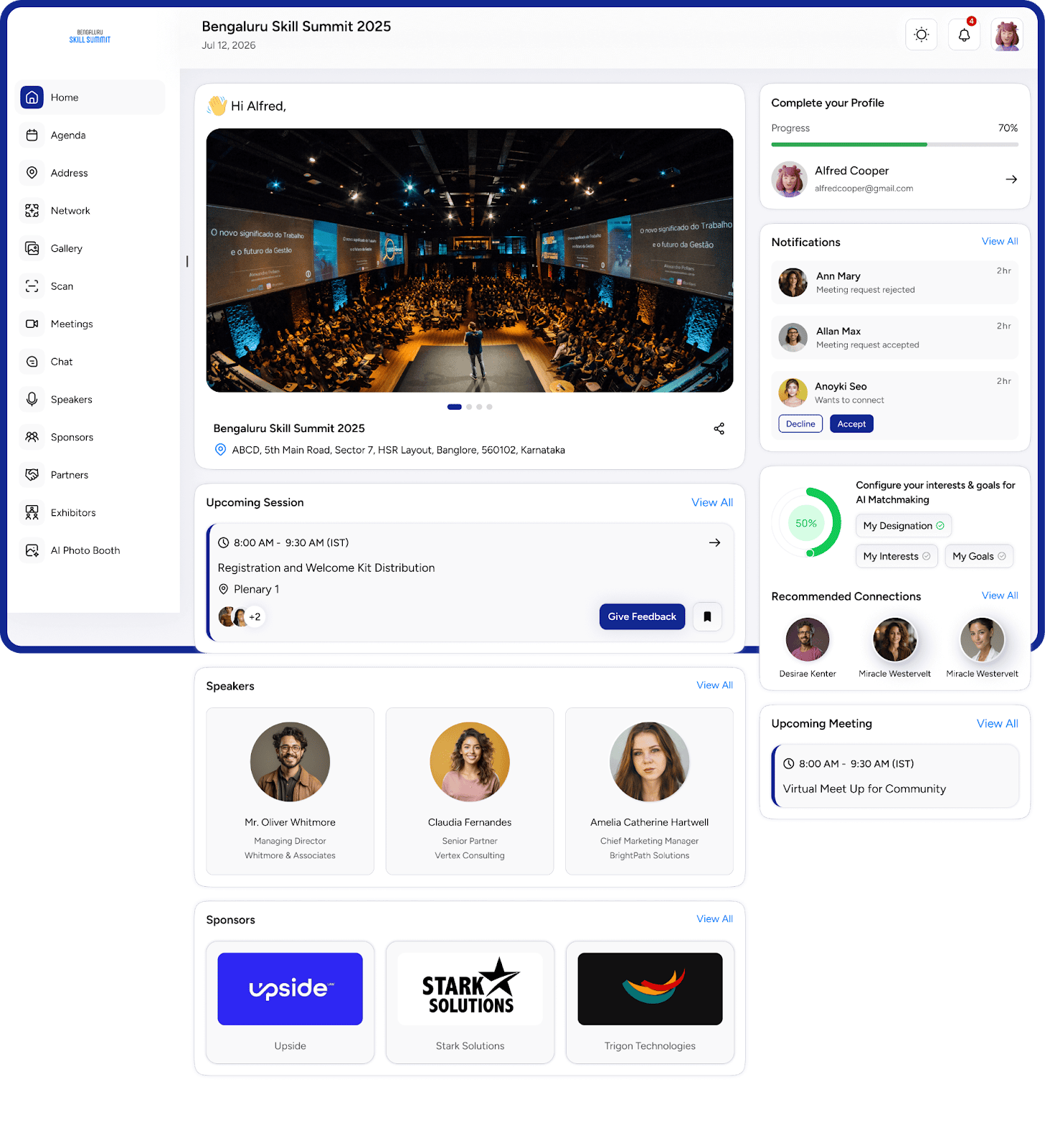
The Event App centralizes all the information attendees need to navigate and make the most of your event.Agenda and Schedule
Browse the full session schedule, filter by track or time slot, and add individual sessions to a personal schedule. Attendees always know what’s on and when.
Speaker Profiles
View bios, photos, social links, and session assignments for every speaker. Attendees can connect with speakers directly from their profile page.
Sponsor Listings
Sponsors get dedicated profile pages with their logos, descriptions, and contact details. Drive sponsor visibility and help attendees discover the companies supporting your event.
Exhibitor Directory
Browse exhibitor profiles complete with booth locations, maps, and direct contact options. Attendees can plan their expo visit and reach out to exhibitors in advance.
Address and Floor Plan
Help attendees navigate confidently before and during the event.- Address and directions — display the venue address with a link that opens directly in Google Maps or the attendee’s preferred navigation app.
- Floor plan — upload a floor plan of the venue so attendees can locate session halls, networking zones, exhibitor booths, catering areas, and other key points at a glance.
AI Avatar Photo Booth
The AI Avatar Photo Booth lets attendees generate personalized AI-created avatars from a selfie or uploaded photo. Attendees choose from a range of avatar styles, and the AI renders a unique, shareable image in seconds. The Photo Booth boosts event engagement, encourages social media sharing, and gives attendees a fun, memorable keepsake — making your event more lively and talked-about online.Push Notifications
Send real-time push notifications to all attendees or targeted segments directly from your event dashboard.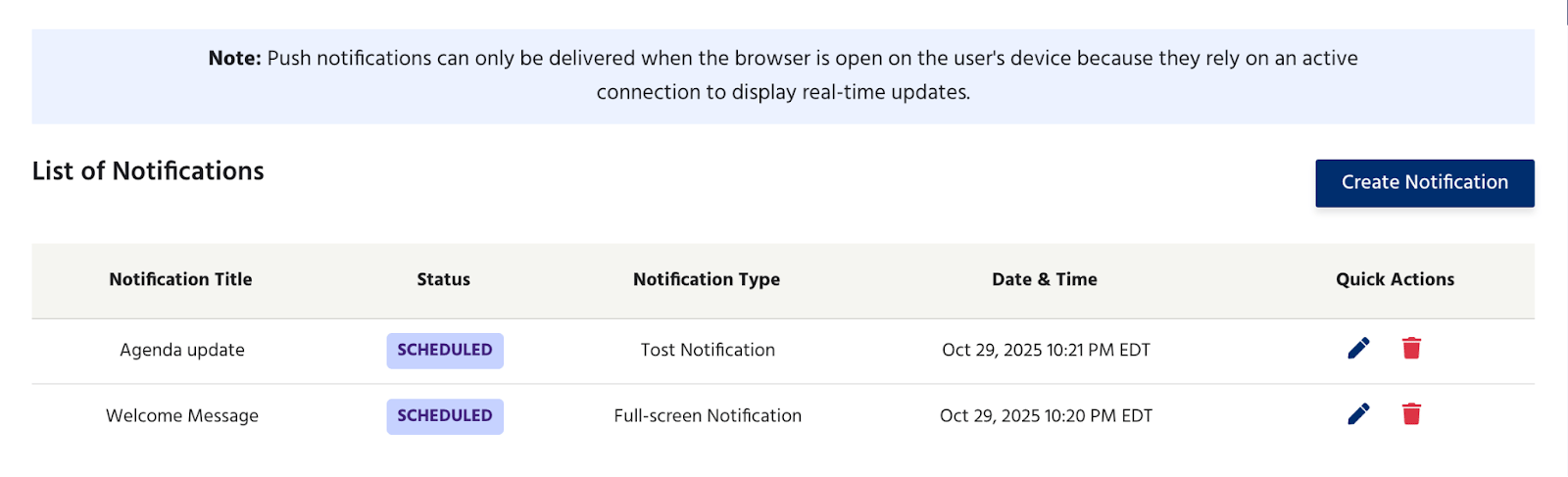
Session Reminders
Alert attendees a few minutes before a keynote or popular session begins, reducing late arrivals and improving session attendance.
Venue and Schedule Updates
Instantly communicate room changes, delays, or last-minute additions to the agenda without relying on PA systems or printed updates.
Sponsor and Exhibitor Announcements
Notify attendees of booth activities, live demos, or special offers from sponsors and exhibitors at the right moment.
Personalized Alerts
Send targeted notifications to specific ticket types or registered workshop groups with information relevant only to them.
Custom Modules
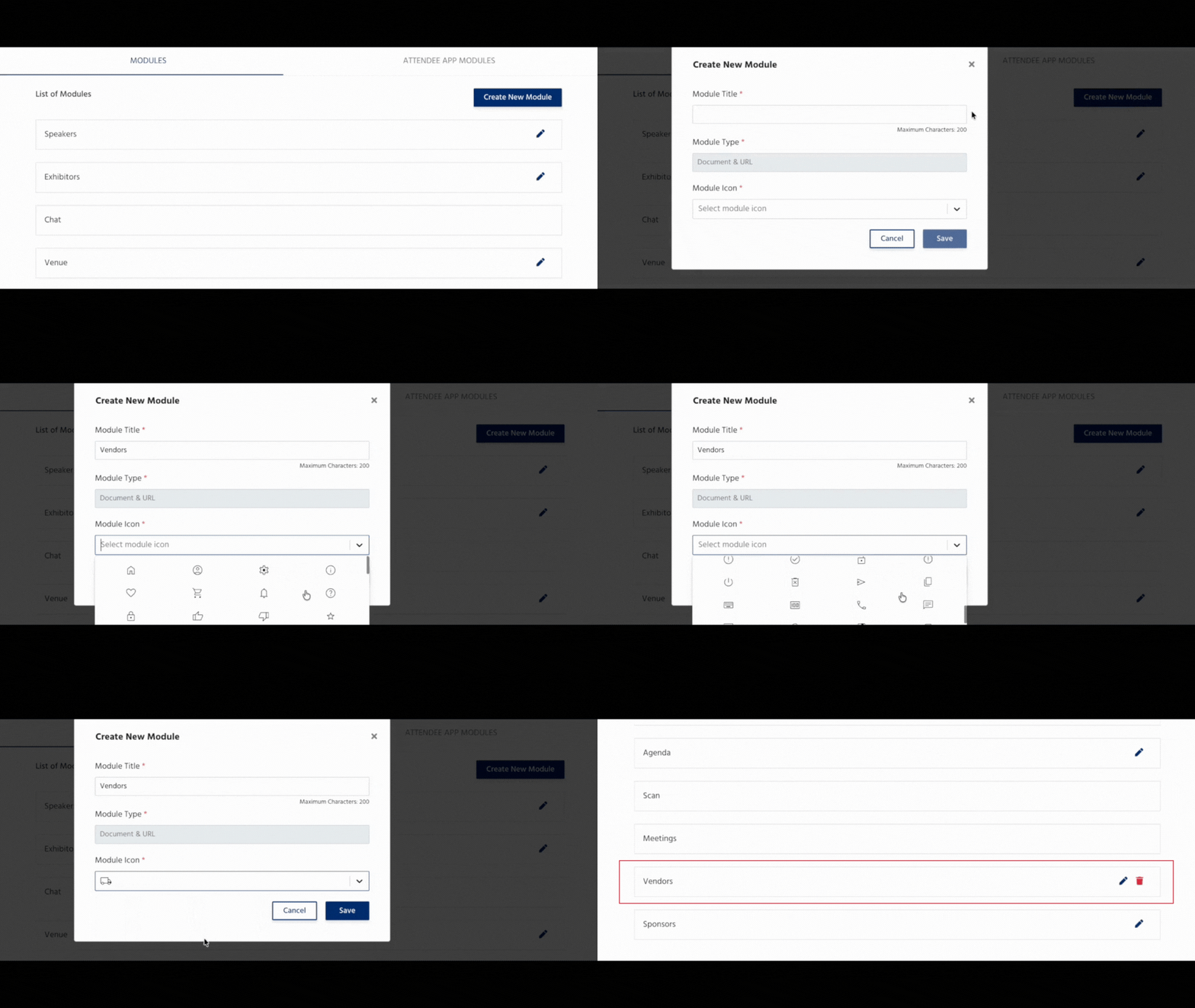
Custom Modules let you extend the Event App with any content or link that makes sense for your event — without any development work. To add a custom module:- Give the module a name (e.g., “Presentation Slides”, “Venue Guide”, “Feedback Form”).
- Write a short description so attendees understand what it contains.
- Choose an icon from the built-in library.
- Provide the target — a URL, document link, or image.
- Links to recorded session replays or presentation decks
- Event brochures and sponsor packages as PDF documents
- Photo galleries and social media walls
- Feedback and survey forms
- Floor plan PDFs or external maps
- Links to companion websites or post-event resources
White-Labeling
Present the Event App as your own branded product. White-labeling lets you customize:Colors and Fonts
Match the app’s color scheme and typography to your event’s visual identity so attendees experience a consistent brand from registration to check-out.
Logos
Replace KonfHub’s logo with your event or organization logo everywhere it appears in the app.
App Icons
Set a custom icon for the app when attendees add it to their home screen, reinforcing your brand on their devices.
Remove KonfHub Branding
Strip all KonfHub references from the attendee-facing experience so the app appears to be a custom-built product for your event.
Progressive Web App — No Installation Required
The Event App is a Progressive Web App (PWA), which means:- Attendees open a link — nothing to download. Share the app URL in your confirmation email, and attendees are in with one tap.
- Works on every platform. Android, iOS, and Windows; phones, tablets, laptops, and desktops.
- Installable if preferred. Attendees can add the app to their home screen for a native app-like experience, complete with your custom icon if white-labeling is enabled.
- Always up to date. Any changes you make — new sessions added, notifications sent, custom modules updated — are reflected immediately for all users.
Event App Use Cases
- Conferences
- Trade Shows & Expos
- Corporate Events
- Workshops & Masterclasses
- Cultural Fests & Festivals
Give conference attendees a single hub for the agenda, speaker bios, networking connections, and live session updates. The meeting scheduler helps professionals find and connect with the right peers before and during the event.
How to Activate the Event App
1
Upgrade to the Gold Plan
The Event App is available on the Gold plan. Upgrade from your KonfHub event dashboard or contact the KonfHub team.
2
Enable the Event App for Your Event
In your event dashboard, navigate to **Apps & Utilities **and enable the Event App toggle. Your event data — attendees, speakers, agenda, sponsors — populates the app automatically.
3
Configure White-Labeling and Branding
Upload your logo, set your brand colors, and choose your fonts. Enable the white-label option and apply your custom app icon.
4
Add Modules
Create any modules or custom modules your event needs — links to presentations, floor plans, feedback forms, or sponsor resources. Each module appears instantly in the app’s navigation.
5
Share the App Link with Attendees
Copy the Event App URL from your dashboard and include it in your registration confirmation email, event communications, and social media posts. Attendees open the link and are ready to go — no account setup required beyond their existing registration.
6
Send Notifications and Engage During the Event
As the event unfolds, use the dashboard to send push notifications about upcoming sessions, venue changes, or sponsor activities. Monitor networking activity and chat to keep engagement high throughout the day.