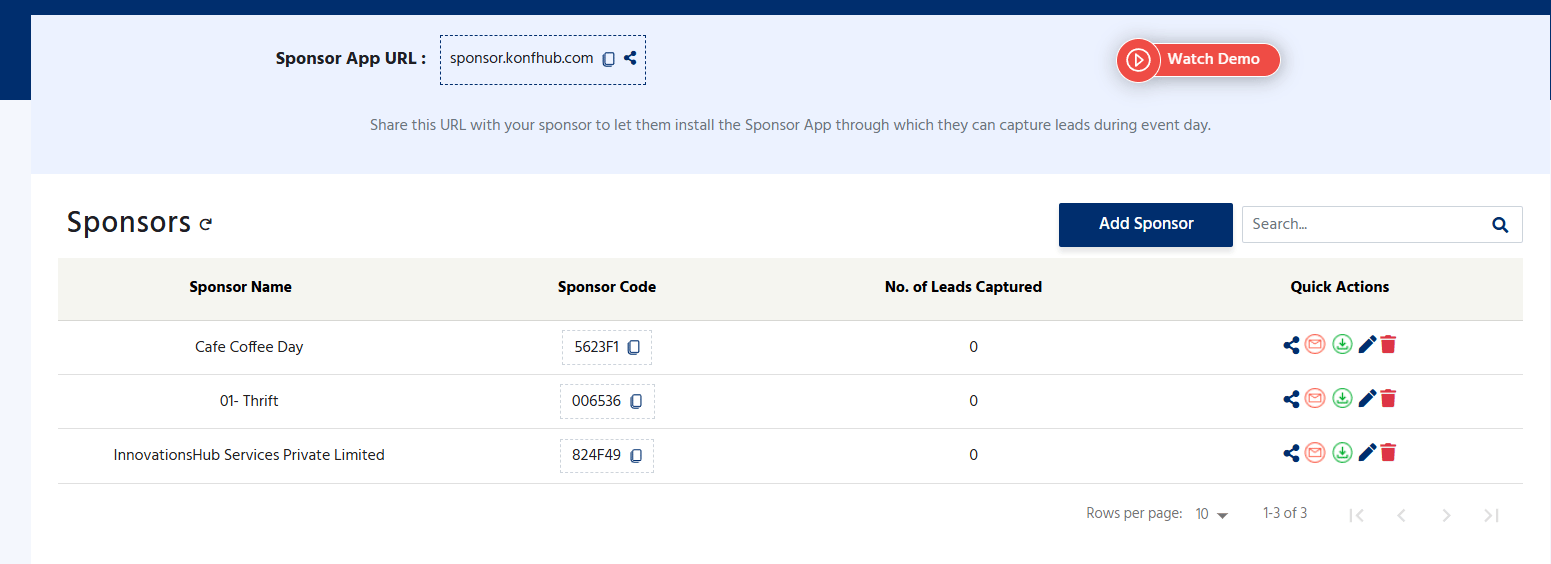
How the Lead Capture App Works
The workflow is straightforward: as an organizer you generate a unique sponsor code for each sponsor, share it with their team, and the sponsor’s booth staff use that code to log into the app and start scanning. Every lead they capture is stored in the cloud against their sponsor code, so the whole team shares a single, synchronized lead list regardless of which device they’re using.Scan Attendee QR Codes
Booth staff point the device camera at the QR code on an attendee’s badge or ticket. The attendee’s registration details are captured instantly and added to the sponsor’s lead list.
Search Existing Leads
Find any previously scanned lead by searching on phone number, email address, or name. Quickly pull up a contact to review details or add a note mid-conversation.
Add Notes and Comments
Annotate each lead with follow-up notes — product interest, conversation highlights, meeting requests, or priority level. Notes are saved against the lead record and visible to the whole team.
Download Leads
Export the complete lead list as a file at any point during or after the event. Hand it straight to your sales or marketing team for follow-up campaigns, CRM import, or pipeline review.
Setting Up Lead Capture for Sponsors
1
Generate a Sponsor Code
In your KonfHub event dashboard, navigate to the Sponsors or Lead Capture section and create a new sponsor code for each sponsor or exhibiting company. You can create as many codes as you have participating sponsors.
2
Share the Code with the Sponsor
Send each sponsor their unique code before the event — via email, your exhibitor portal, or directly through the KonfHub platform. The sponsor shares this code with every member of their booth team.
3
Booth Staff Open the Lead Capture App
Each team member navigates to sponsor.konfhub.com on their own device — phone, tablet, or laptop. No installation required. They enter the sponsor code to log in and gain access to the event’s lead capture interface.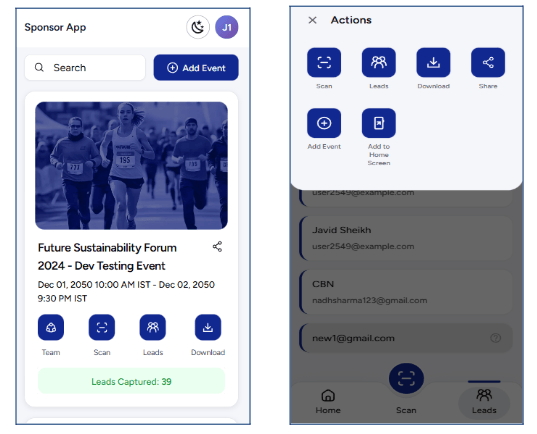
4
Scan Attendee QR Codes at the Booth
When a visitor approaches the booth, any staff member taps Scan QR Code, points the camera at the attendee’s badge or ticket, and the visitor’s details are captured and saved to the shared lead list in under a second.
5
Add Comments to High-Value Leads
After a meaningful conversation, booth staff add a note to the lead — recording which product the visitor was interested in, what follow-up action was agreed, or any context that will help the sales team prioritize. Notes appear immediately for all team members using the same sponsor code.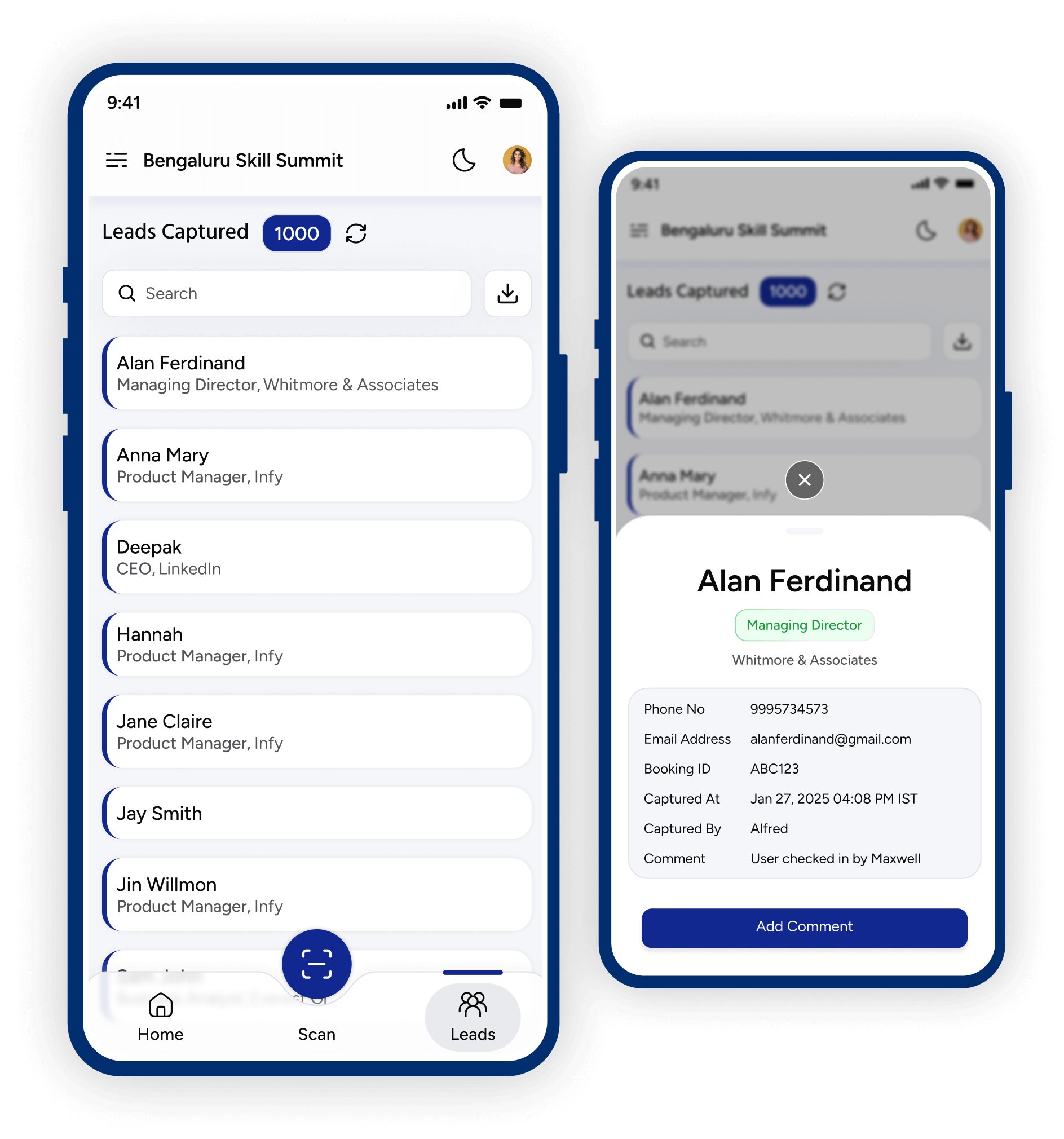
6
Download Leads for Post-Event Follow-Up
At any point during or after the event, the sponsor logs in and downloads the full lead list. The exported file contains all captured registration details and any notes added by the team, ready for import into a CRM or use in follow-up outreach.
Team Access and Lead Synchronization
One sponsor code serves the entire booth team. Every staff member who logs in with that code sees the same, live-updated lead list — so scans from one person’s phone appear immediately on a colleague’s tablet. This approach has several practical advantages:No Account Management Required
Sponsors don’t need individual KonfHub accounts for every team member. One code, shared freely across the booth team, is all that’s needed.
Works Across Any Mix of Devices
Team members can use Android phones, iPhones, iPads, Windows laptops — any combination. Leads sync across all devices through the shared code.
Real-Time Lead Visibility
Anyone on the team can see all leads captured so far, preventing duplicate conversations and enabling coordinated follow-up even during the event.
Single Downloadable Dataset
When the event ends, there’s one lead list to download — not a separate file per device. The sponsor gets a clean, consolidated record of every booth visitor.
As the organizer, each sponsor code gives access only to that sponsor’s own leads. Sponsors cannot see the lead data of other exhibitors, and they cannot access any other part of your KonfHub event dashboard.
No Installation Required — PWA
The Lead Capture App is a Progressive Web App (PWA). This has real, practical benefits for sponsors who may not know KonfHub and don’t want to install an unfamiliar app on their company devices:- Open a browser and go. Any modern browser on any device — Android, iOS, or Windows — can access the app instantly via the URL.
- No app store approval needed. Booth staff traveling to your event don’t need to prepare in advance. They open the link, enter their sponsor code, and start scanning within seconds of arriving.
- Install if preferred. If a sponsor’s team wants the app on their home screen for quicker access, they can add it via the browser’s “Add to Home Screen” option. It behaves like a native app from that point on.
Use Cases
The Lead Capture App is a natural fit for any event format that includes booths or exhibition space.- Expos and Trade Shows
- Conferences with Exhibition Areas
- Trade Fairs and Industry Events
- Corporate and Internal Events
At large-scale expos with dozens or hundreds of exhibitors, the Lead Capture App gives every booth a standardized, professional lead collection tool. Attendees carry their QR code on a printed badge or lanyard, and booth staff scan it effortlessly throughout the day.
What Attendees Experience
From the attendee’s perspective, the process is frictionless. They approach a booth, and the booth staff holds up their device to scan the QR code on the attendee’s badge or ticket (which they received when they registered via KonfHub). The scan takes under a second. The attendee doesn’t need to open any app, fill in any form, or take any action — their details are shared instantly and automatically.Lead Data Captured
When a sponsor scans an attendee’s QR code, the lead record contains the registration details the attendee provided when they signed up for the event. This typically includes:- Full name
- Email address
- Phone number
- Company and job title (if collected during registration)
- Any custom registration fields that you’ve configured for your event