The Automated Referral Contest is available on the Silver and Gold plans. LinkedIn Share integration (for post-registration sharing) is available on Silver and above, with white-labeled LinkedIn sharing on Gold.
How the Automated Referral Contest Works
When you enable a referral contest for your event, each registered attendee automatically receives a unique referral link tied to their registration. When they share that link and someone else registers through it, the original attendee earns a referral credit. At the end of the contest period (typically the event date), you award prizes to the attendees with the most referrals. KonfHub handles the entire mechanics automatically — tracking clicks, registrations, and the leaderboard — so you don’t need any external tool or manual counting.Unique Referral Links
Every registered attendee gets a personalized link. When a new attendee registers via that link, the referral is attributed automatically.
Live Leaderboard
A public or private leaderboard shows top referrers in real time, fueling friendly competition and encouraging participants to share more.
Automated Attribution
KonfHub tracks every referral through registration completion — not just link clicks — so only genuine registrations count toward prizes.
Organizer Dashboard
View referral statistics, top performers, and total referral-driven registrations from the Gamification section of your dashboard at any time.
Enabling and Configuring a Referral Contest
1
Open the Gamification Section
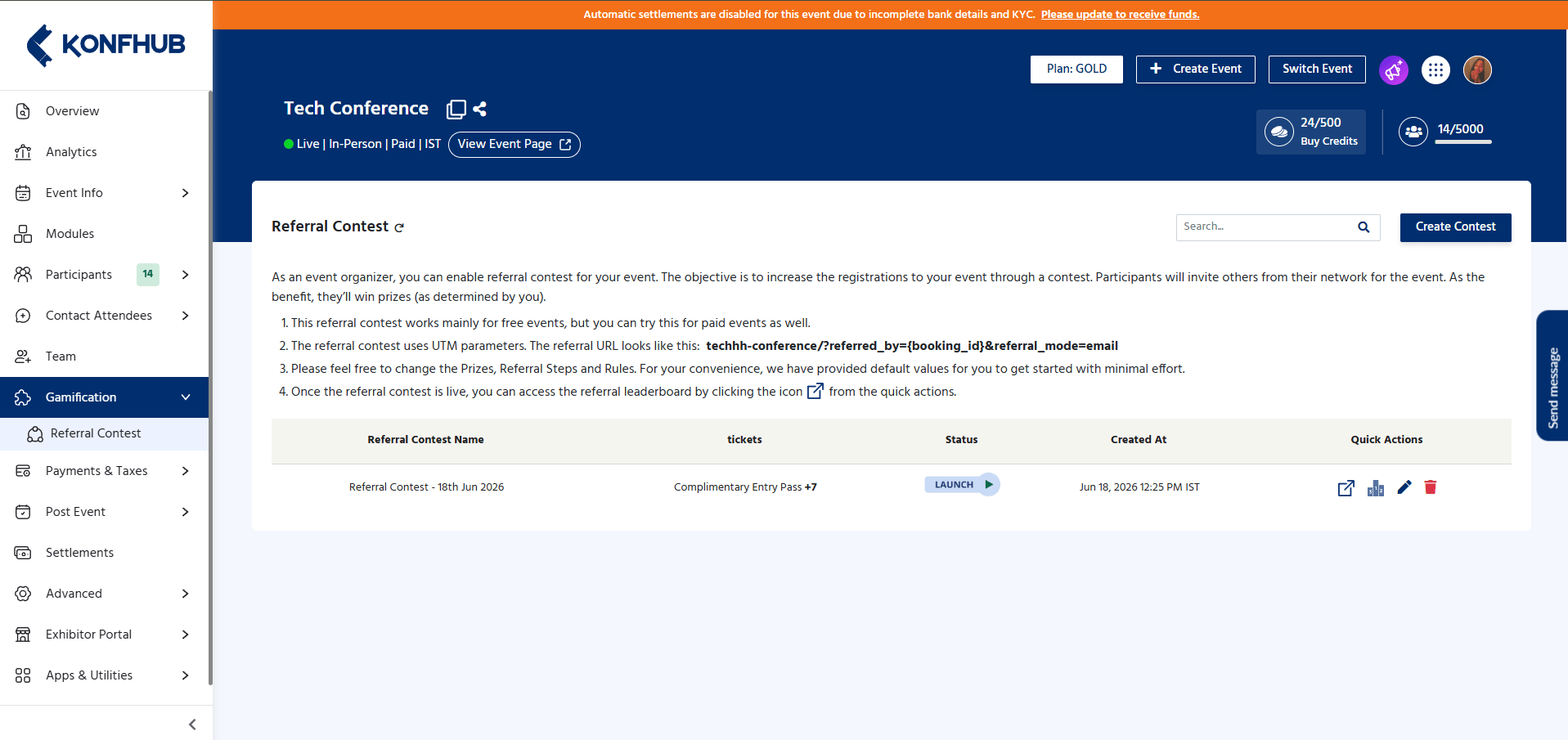
In your event dashboard, click Gamification in the left navigation menu. You’ll see the Referral Contest panel.
2
Enable the Referral Contest
Toggle Referral Contest to the On position. This immediately activates unique referral link generation for all current and future registrants.
3
Set the Contest Period
Define the start and end dates for the contest. The contest typically runs from the moment you publish your event until the event date, but you can tighten the window to create urgency (for example, “Register and refer before Friday to be eligible for prizes”).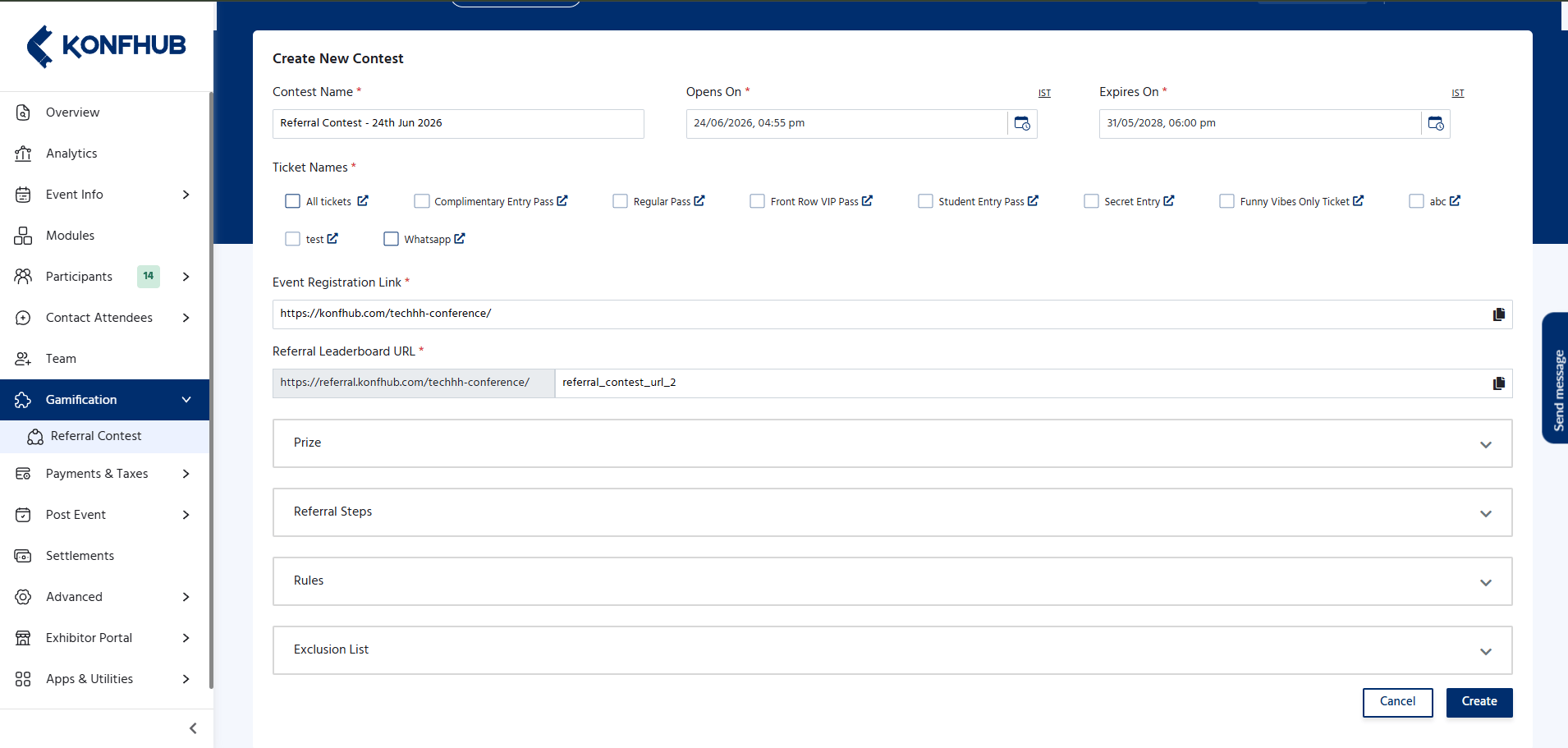
4
Configure Prize Tiers
Add prizes for your top referrers. You can set multiple reward tiers — for example, a grand prize for first place, a runner-up prize for second and third, and a participation reward for everyone who generates at least one referral.
5
Write the Contest Description
Enter a short description of the contest that attendees will see on their referral page. Explain the prizes clearly and call out the deadline to create a sense of urgency.
6
Save and Publish
Click Create. From this point, every new registrant receives a unique referral link in their confirmation email and can access it from their registration confirmation page.
Setting Prizes and Reward Tiers
KonfHub supports flexible prize tiers so you can incentivize both your top performers and casual sharers.Tiered Prize Structure (Recommended)
Tiered Prize Structure (Recommended)
Set distinct prizes for rank 1, rank 2, rank 3, and a consolation prize for anyone who generates 1 or more referrals. This motivates a wide range of attendees — those competing seriously for the top spot and those who just want to share with a few friends.Example:
- 1st Place: ₹5,000 Amazon gift card
- 2nd Place: ₹2,500 Amazon gift card
- 3rd Place: ₹1,000 Amazon gift card
- Any referral (1+): Exclusive event merchandise
Flat Reward for All Referrers
Flat Reward for All Referrers
If you want to maximize the number of people who share (rather than rewarding only the top few), set a single reward that every attendee who makes at least one successful referral receives. This is effective for community-driven events where broad participation matters more than a competitive leaderboard.
Early-Bird Referral Bonus
Early-Bird Referral Bonus
Offer a higher-value reward for referrals made within the first week of ticket launch. This creates a natural spike in word-of-mouth activity right when you need registration momentum the most.
How Attendees Participate
Once the referral contest is active, attendees engage with it through their own referral page — no additional app or login is needed.1
Attendee Receives Confirmation Email
After registering, each attendee receives a confirmation email that includes their unique referral link and a brief explanation of the contest.
2
Attendee Shares Their Link
The attendee shares the link via WhatsApp, Twitter/X, LinkedIn, email, or any other channel. KonfHub’s referral page is designed to be shareable — it loads the event registration page with the referral code automatically embedded.
3
New Registration Is Attributed
When someone registers through the referral link, KonfHub records the referral against the original attendee’s account. Only completed registrations (not just page visits) count as referrals.
4
Attendee Tracks Their Progress
Attendees can check their referral count and their position on the leaderboard at any time using their referral link page, motivating continued sharing throughout the contest period.
Tracking the Referral Leaderboard
The Gamification section of your dashboard gives you a real-time view of referral contest performance:- Total referral registrations — how many attendees registered via a referral link.
- Top referrers list — ranked table of attendees by referral count, including their name, email, and number of successful referrals.
- Referral conversion rate — the percentage of referral link clicks that converted to registrations.
- Daily referral trend — a chart showing referral activity over time, helping you identify which sharing bursts correlate with your marketing pushes.
LinkedIn Share Integration
KonfHub includes a LinkedIn Share feature that makes it easy for newly registered attendees to announce their participation directly from the registration confirmation page. A single click populates a pre-written LinkedIn post with the event name, date, and a link to the event page — ready for the attendee to publish. This works alongside the referral contest: every social share increases visibility, which drives more registrations, which earn the sharer more referral credits.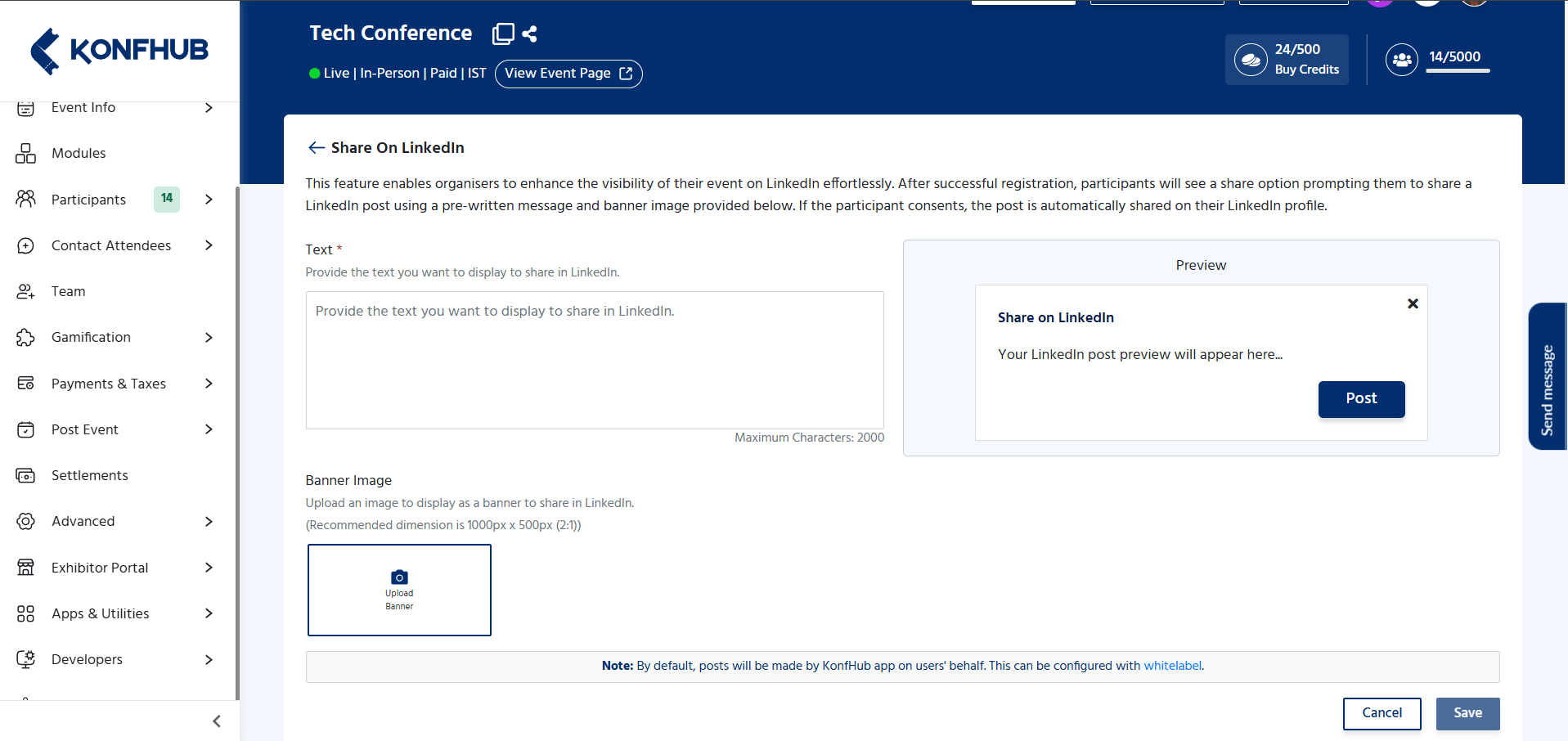
Silver Plan
LinkedIn Share is enabled with KonfHub’s branding. Attendees can share their participation on LinkedIn immediately after registering.
Gold Plan
White-labeled LinkedIn Share — the post and preview image reflect your event branding rather than KonfHub’s default appearance.
Plan Summary
The Gamification section is not available on Freemium or Lite plans. Upgrade to Silver or Gold to access referral contests and LinkedIn Share. See the KonfHub pricing page for full plan details.