Introduction
Event attendees often have different preferences and requirements. While some participants only need access to the main event, others may want merchandise, workshops, meals, premium experiences, or exclusive benefits. KonfHub’s Ticket Add-Ons feature allows organizers to offer these optional purchases alongside primary event tickets, enabling attendees to customize their registrations while creating additional revenue opportunities.What Are Ticket Add-Ons?
Ticket Add-Ons are optional products, services, or experiences that attendees can purchase in addition to their primary event ticket. Unlike regular tickets, add-ons:- Cannot be purchased independently.
- Must be linked to one or more primary tickets.
- Are displayed only to eligible attendees during registration.
- Can be either free or paid.
Benefits of Using Ticket Add-Ons
Increase Event Revenue
Offer premium experiences, merchandise, workshops, or additional services without creating multiple ticket variations. Examples include:- Event T-shirts
- Networking dinners
- Workshop passes
- Goodie kits
- VIP experiences
Simplify Ticket Management
Instead of creating separate tickets for every possible combination, organizers can maintain a clean ticket structure and attach optional add-ons as needed.Improve Attendee Experience
Participants can personalize their event journey by selecting only the extras they want, resulting in a more flexible and satisfying registration process.Better Planning and Inventory Management
Since add-ons are purchased during registration, organizers gain accurate insights into:- Merchandise quantities
- Meal requirements
- Workshop participation
- Premium access counts
- Logistics planning
Common Examples of Ticket Add-Ons
Marathons and Sports Events
Popular add-ons include:- Event T-shirts
- Finisher medals
- Timing chips
- Training sessions
- Post-race meal vouchers
Tech Conferences
Typical add-ons include:- Conference merchandise
- Goodie bags
- Workshop passes
- Networking dinner access
- Certification examinations
Workshops and Training Programs
Common options include:- Printed study materials
- Session recordings
- One-on-one mentoring sessions
- Premium certificates
Music and Entertainment Events
Examples include:- VIP lounge access
- Meet-and-greet passes
- Merchandise bundles
- Food and beverage vouchers
Creating Ticket Add-Ons
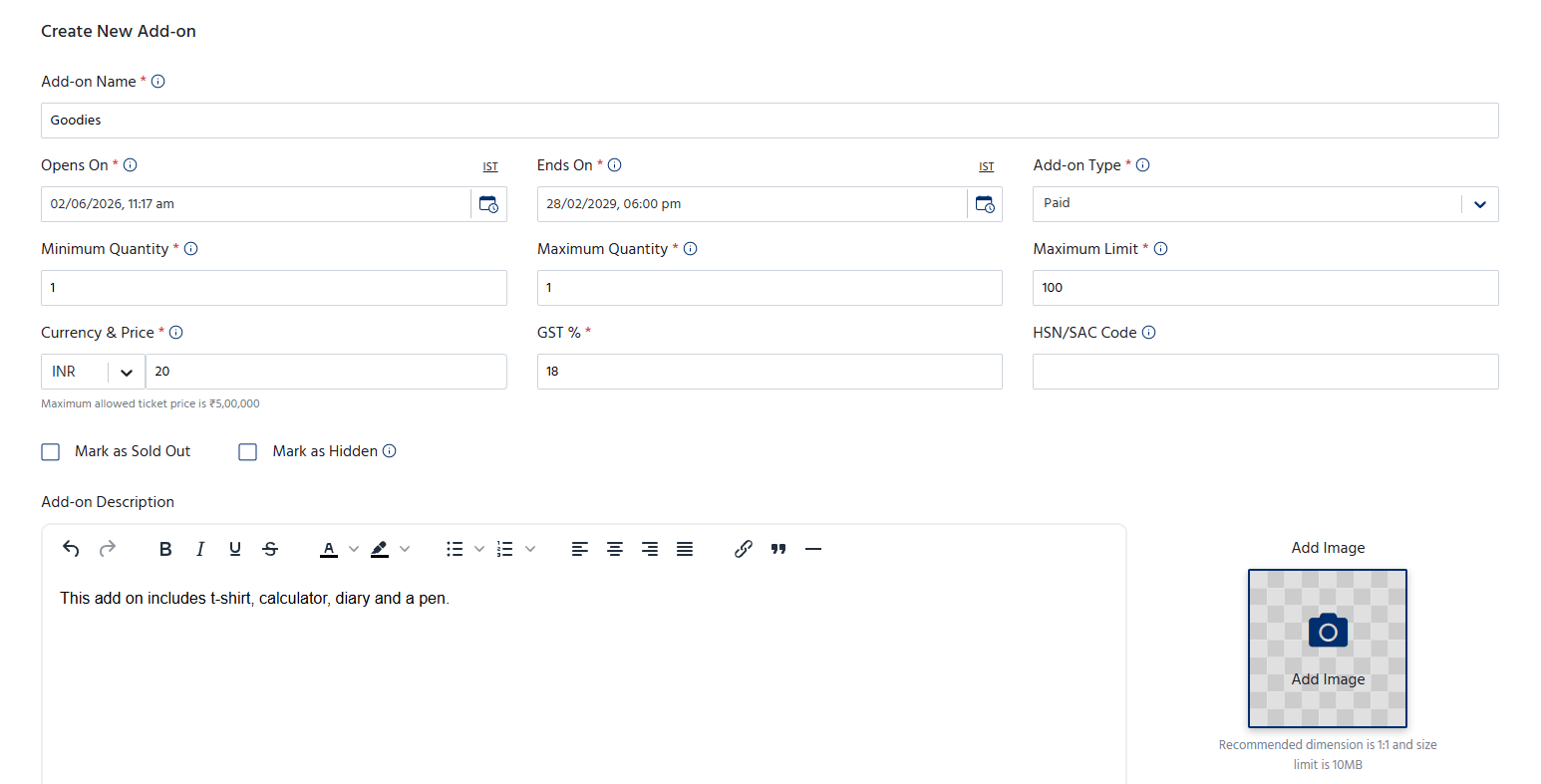
Creating an add-on is similar to creating a standard event ticket.Step 1: Navigate to the Add-Ons Section
- Open your Event Dashboard.
- Go to Tickets → Add-ons.
- Click Create Add-On.
Step 2: Configure the Add-On Ticket
Enter the required information, including:- Add-on name
- Description
- Pricing
- Quantity limits
- Availability dates
- Marathon T-Shirt
- Workshop Pass
- Networking Dinner Access
- Goodie Kit
Step 3: Upload an Image
Unlike regular tickets, add-ons support image uploads. You can upload images such as:- T-shirt designs
- Medal previews
- Merchandise photos
- Goodie kit contents
Step 4: Configure GST Information
Adding GST information is mandatory for all add-ons. You must provide:- Applicable GST percentage
- Optional HSN/SAC code (Product Classification Code)
- Generate GST-compliant invoices
- Properly classify products and services
- Maintain accurate financial records
Linking Add-Ons to Main Tickets
Once the add-on has been created, it must be connected to one or more primary event tickets.To Link Add-Ons:
- Open the primary ticket you want to edit.
- Locate the Ticket Add-Ons section.
- Select one or multiple add-ons.
- Save your changes.
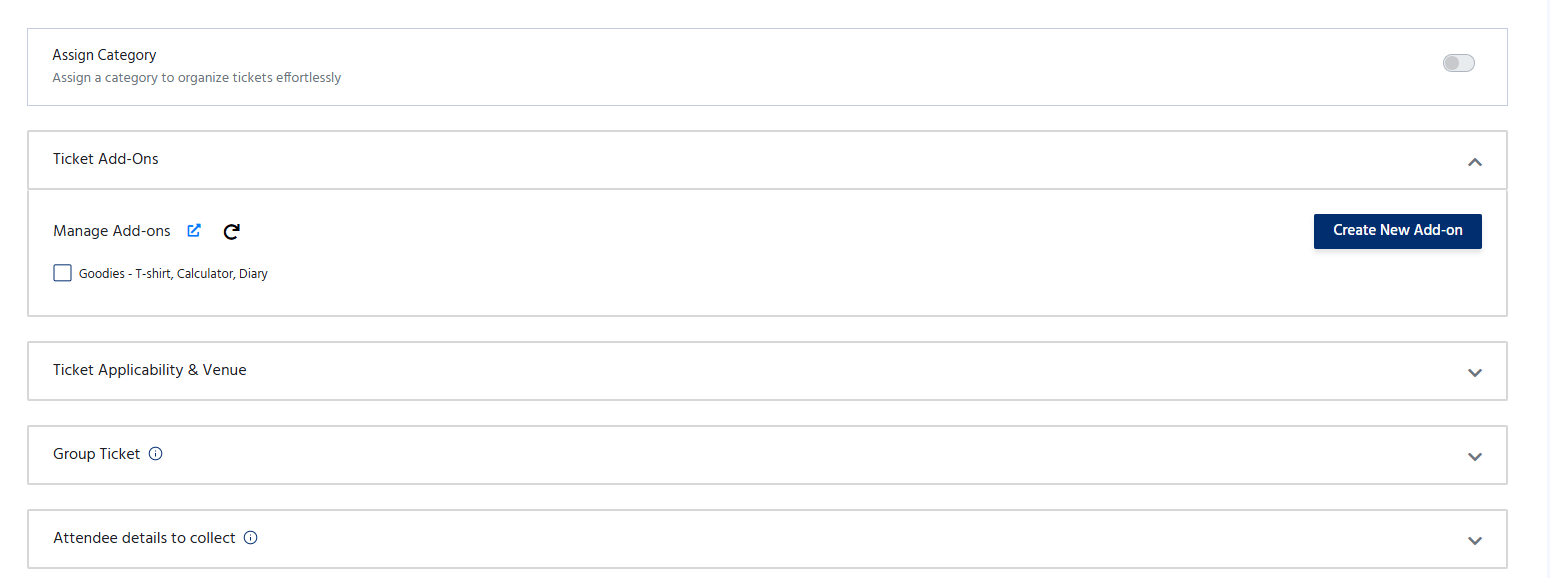
Example
This flexibility ensures attendees only see relevant options.
How Attendees Purchase Add-Ons
The add-on experience is integrated directly into the registration process.Step 1: Select a Primary Ticket
The attendee chooses their preferred event ticket and clicks Proceed.Step 2: Fill Registration Details
Participants enter their registration information on the checkout page as usual.Step 3: Select Optional Add-Ons
All add-ons linked to the selected ticket are displayed on the same page. Attendees can:- Review available add-ons
- Add or remove optional purchases
- Enter additional information if required
- T-shirt size
- Workshop participant information
- Merchandise recipient details
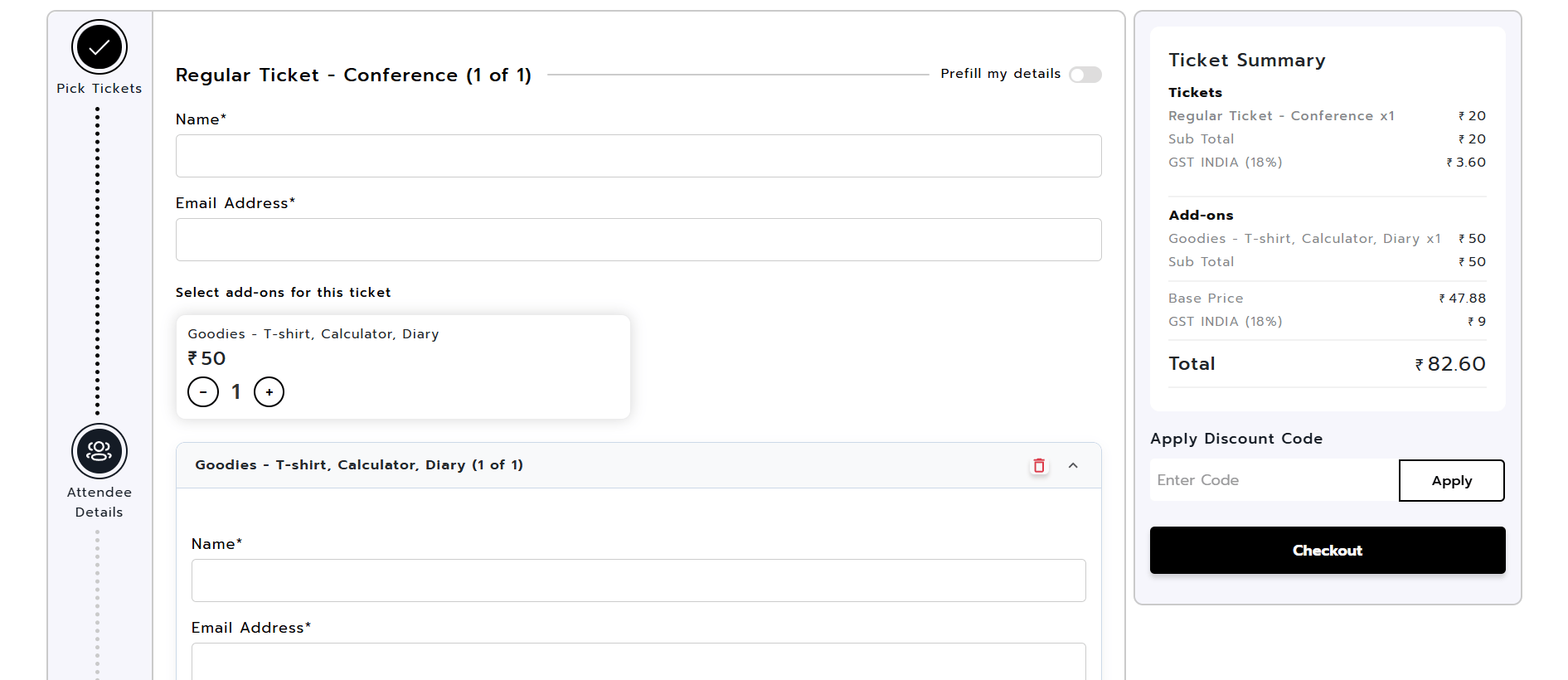
Step 4: Complete Checkout
The attendee proceeds to payment and completes the registration in a single transaction. Both the primary ticket and all selected add-ons are included in the final order.Viewing Add-On Registrations
Organizers can track all purchased add-ons separately. Navigate to: Participants → Attendees → Add-ons From this section, organizers can:- View all add-on purchases
- Monitor quantities sold
- Export participant information
- Plan logistics and fulfillment activities
Best Practices
To maximize the effectiveness of Ticket Add-Ons:Use Clear Names
Choose descriptive titles such as:- Official Event T-Shirt
- Networking Dinner Pass
- Premium Workshop Access
Upload High-Quality Images
Visual representations improve conversion rates and help attendees make informed decisions.Keep Add-Ons Relevant
Only attach add-ons to ticket categories where they make sense.Plan Inventory Carefully
Set appropriate quantity limits for merchandise, meals, and limited-capacity experiences.Provide Detailed Descriptions
Clearly communicate what participants receive with each add-on to avoid confusion./